Skip to content
Best AI Customer Service Chatbots (Automate Support Without Losing Quality in 2026)
Quick Navigation: How I Tested • Comparison Table • Risks • Best Tools • FAQ
Most customer support questions are repetitive. “Where’s my order?” “How do I reset my password?” “What’s your refund policy?” “Do you ship internationally?” These questions have clear, consistent answers — and they consume the majority of a support team’s time. Every minute spent answering the same question for the hundredth time is a minute not spent on complex issues that actually require human judgment.
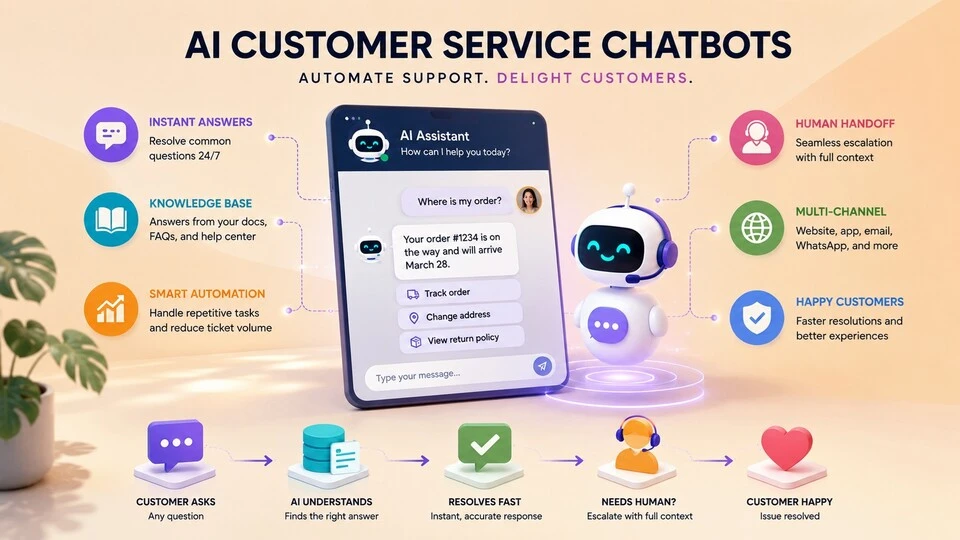
AI chatbots handle this by providing instant, accurate answers to common questions around the clock. The best ones go beyond scripted FAQ responses — they understand natural language, pull answers from your knowledge base, handle multi-turn conversations, and know when to escalate to a human instead of guessing at an answer they can’t provide.
The difference between a good AI chatbot and a bad one is the customer experience. A bad chatbot frustrates customers with irrelevant answers, loops them through menus, and makes them repeat information when they finally reach a human. A good chatbot resolves simple issues instantly and routes complex ones to the right person with full context — making the customer’s experience better than waiting in a queue.
For the broader customer support workflow, Best AI Tools for Customer Support Teams covers team tools beyond chatbots. For customer onboarding where chatbots play a support role, Best AI Tools for Customer Onboarding addresses that phase.
Quick answer: Intercom Fin is the most sophisticated AI chatbot for SaaS and tech companies. Zendesk AI is best for enterprises already on Zendesk. Tidio is the most accessible option for small businesses and e-commerce.
How I Tested These Tools
I evaluated each tool based on what matters for customer service chatbots:
- Answer accuracy — does the chatbot provide correct, helpful answers from your knowledge base
- Natural conversation — does it understand varied phrasing, follow-up questions, and context
- Escalation quality — when it can’t answer, does it route to a human smoothly with full context
- Setup effort — how much work is required to get the chatbot operational with your content
- Customer satisfaction — does the chatbot improve or worsen the customer experience
I reviewed each tool’s features, tested the conversation quality, and consulted feedback from customer support teams. I did not fabricate resolution rate statistics or invent customer satisfaction scores.
Comparison Table
| Tool | Best For | Key Strength | Pricing |
|---|---|---|---|
| Intercom Fin | SaaS and tech support | Answers from your docs with human-like conversation | Paid |
| Zendesk AI | Enterprise support | AI integrated into the most used enterprise support platform | Paid |
| Tidio | Small business and e-commerce | Affordable chatbot with live chat and email | Freemium |
| Drift | B2B sales and support | Conversational AI for lead qualification and support | Paid |
| Freshdesk Freddy | Mid-market support | AI agent inside an affordable helpdesk platform | Freemium |
| Ada | High-volume automation | Enterprise chatbot built for scale and multilingual support | Paid |
Best AI Customer Service Chatbots
Intercom Fin — Best for SaaS and Tech Support
Intercom Fin is the most advanced AI customer service chatbot available. It reads your help documentation, learns your product, and answers customer questions in natural conversation — not scripted responses. When it can’t answer, it hands off to a human agent with the full conversation history so the customer doesn’t repeat themselves.
What it does well:
- generates answers directly from your help center, documentation, and knowledge base — no manual scripting of responses
- handles multi-turn conversations naturally — customers can ask follow-up questions and get contextual responses
- knows its limits — when it can’t answer confidently, it escalates to a human with the full conversation attached
- provides conversation analytics that show what customers ask most, where the bot succeeds, and where it fails
- supports multiple languages without separate configuration for each
Where it falls short: Fin’s answer quality depends entirely on your documentation. If your help center is incomplete, outdated, or poorly organized, the bot gives incomplete, outdated, or confusing answers. Intercom’s pricing is significant and scales with conversation volume — high-volume support operations face substantial costs. The bot handles factual questions well but struggles with emotional customer interactions — frustrated customers who need empathy, not information. And Fin works best for product support; it’s less effective for non-product issues (billing disputes, account-specific problems) that require accessing customer records.
For the complete Intercom platform, see Best AI Tools for Customer Support Teams.
Best for: SaaS companies and tech businesses with comprehensive help documentation that want to automate a significant portion of their support volume.
Zendesk AI — Best for Enterprise Support
Zendesk is the most widely used enterprise support platform, and its AI capabilities add intelligent routing, automated responses, and agent assistance directly into the existing workflow. For organizations already on Zendesk, adding AI doesn’t require changing the support infrastructure.
What it does well:
- integrates AI directly into the Zendesk support platform — no separate chatbot tool to manage
- automatically categorizes, routes, and prioritizes incoming tickets using AI analysis of the content
- provides AI-suggested responses that agents can review and send — speeding up human responses alongside bot automation
- supports bot conversations that access customer account data, order history, and previous tickets for personalized responses
- handles enterprise scale with sophisticated routing rules across multiple teams, products, and languages
Where it falls short: Zendesk AI is most valuable for organizations already using Zendesk — adopting it specifically for the AI means adopting the entire Zendesk platform, which is a significant commitment. The AI features require the higher-tier Zendesk plans, adding cost to an already expensive platform. Bot setup requires training on your specific content and workflows, which takes time and iteration. And the AI assistance works best for structured support processes — highly variable or creative support interactions benefit less from automation.
Best for: enterprises already using Zendesk that want to add AI automation to their existing support workflow without adopting a separate chatbot platform.
Tidio — Best for Small Business and E-Commerce
Tidio provides an affordable chatbot that handles the most common small business support needs — answering product questions, tracking orders, managing returns, and capturing leads. The combination of AI chatbot, live chat, and email in one affordable package makes it the most accessible option for businesses that can’t justify enterprise support tools.
What it does well:
- provides AI chatbot, live chat, and email management in one affordable platform
- includes pre-built e-commerce templates for common scenarios (order tracking, product recommendations, return requests)
- visual chatbot builder lets you create conversation flows without coding
- integrates with Shopify, WooCommerce, and other e-commerce platforms for real-time order data
- free plan includes basic chatbot functionality that’s genuinely usable
Where it falls short: Tidio’s AI is less sophisticated than Intercom Fin or Zendesk AI. The natural language understanding handles common phrasing but struggles with complex or unusual questions. The pre-built templates work well for standard e-commerce scenarios but require customization for unique business processes. The free plan limits conversations and features significantly. And as your support volume grows, Tidio’s simplicity becomes a limitation — teams that need advanced routing, analytics, and workflow management outgrow it.
For e-commerce tools beyond support, see Best AI Tools for E-commerce.
Best for: small businesses and e-commerce stores that need affordable customer support automation — especially those on Shopify or WooCommerce with standard support needs.
Drift — Best for B2B Sales and Support
Drift blurs the line between support chatbot and sales tool. It qualifies website visitors, routes high-intent prospects to sales, handles support questions, and books meetings — all through conversational AI. For B2B companies where the website serves both support and sales functions, Drift handles both.
What it does well:
- combines customer support with lead qualification — identifying which website visitors are prospects and routing them appropriately
- books meetings with sales reps directly through chatbot conversations, eliminating scheduling friction
- provides targeted messaging based on visitor behavior, company data, and page context
- handles support questions for existing customers while simultaneously engaging new prospects
- integrates with CRM and marketing automation tools for a unified view of customer interactions
Where it falls short: Drift’s dual focus (sales + support) means neither function is as deep as dedicated tools. The support capabilities are less sophisticated than Intercom or Zendesk. The sales features are less powerful than dedicated sales engagement platforms. B2C companies and businesses without a sales team get less value from the lead qualification features. And Drift’s pricing targets mid-market and enterprise B2B companies — small businesses find better value in Tidio or Intercom.
For sales-focused tools, see Best AI Tools for Sales Teams.
Best for: B2B companies whose website serves both sales and support functions and want one conversational AI to handle both — qualifying prospects while supporting customers.
Freshdesk Freddy — Best for Mid-Market Support
Freshdesk is an affordable alternative to Zendesk, and Freddy is its AI assistant. Freddy handles routine tickets, suggests responses to agents, and automates workflows — providing enterprise-like AI capabilities at a price point that mid-market companies can justify.
What it does well:
- provides AI chatbot and agent assistance inside an affordable, full-featured helpdesk platform
- auto-resolves common tickets by matching questions against your knowledge base articles
- suggests responses and next actions to agents based on ticket content and historical patterns
- automates ticket routing, prioritization, and assignment based on content and agent availability
- affordable pricing compared to Zendesk and Intercom — especially for growing teams
Where it falls short: Freddy’s AI is functional but less polished than Intercom Fin. The natural language understanding handles standard support scenarios well but struggles with nuanced or complex conversations. The knowledge base matching can be rigid — if your documentation doesn’t closely match how customers phrase their questions, the bot misses answers. And while Freshdesk is more affordable than Zendesk, the AI features still require paid plans that add cost beyond the base helpdesk.
Best for: growing businesses that need AI-powered support at a lower price point than enterprise platforms — especially teams that want a full helpdesk with AI rather than a standalone chatbot.
Ada — Best for High-Volume Multilingual Support
Ada is built for enterprises that handle massive support volumes across multiple languages. Its AI resolves a high percentage of conversations automatically, supports dozens of languages without separate configurations, and integrates with backend systems to perform actions (not just answer questions).
What it does well:
- handles high conversation volumes with AI resolution rates that reduce the need for human agents significantly
- supports dozens of languages with consistent quality, making it suitable for global businesses
- performs actions beyond answering questions — processing refunds, updating accounts, changing subscriptions — by connecting to backend systems
- provides detailed analytics on bot performance, conversation outcomes, and areas for improvement
- enterprise-grade security and compliance features for regulated industries
Where it falls short: Ada is enterprise software with enterprise pricing and implementation requirements. Small and mid-size businesses don’t need this level of automation and can’t justify the cost. Implementation is complex — connecting Ada to backend systems for action-taking requires technical resources. The AI handles structured, predictable interactions well but is less effective for highly emotional or unusual customer situations. And the high automation rate comes with a tradeoff: some customers prefer human interaction and feel frustrated when they can’t easily reach a person.
For customer retention beyond support, see Best AI Tools for Customer Retention.
Best for: large enterprises with high support volumes across multiple languages that want to automate a significant percentage of customer interactions — airlines, telecom, banking, global e-commerce.
The Real Risks of AI Chatbots in Customer Service
1. Frustrating Customers Instead of Helping Them
A chatbot that can’t answer the question but won’t connect you to a human is worse than no chatbot at all. Customers who encounter unhelpful bots become more frustrated than customers who simply wait in a queue. The most critical chatbot feature isn’t answer quality — it’s knowing when to escalate. Configure your chatbot to connect to a human quickly when it can’t help, not to loop customers through irrelevant suggestions.
2. Outdated Answers from Stale Documentation
Chatbots answer from your knowledge base. If your knowledge base is outdated — old pricing, deprecated features, changed policies — the chatbot confidently gives wrong answers. Maintaining your documentation isn’t optional when a chatbot serves it to customers. Assign ownership for knowledge base accuracy and review it regularly.
3. Losing the Human Touch
Some customer interactions need empathy, not efficiency. A customer who just had a terrible experience needs to feel heard. A customer dealing with a sensitive issue needs human judgment. Chatbots that handle these situations with scripted responses make the customer feel like the company doesn’t care. Identify the interaction types that should always go to humans and configure your chatbot accordingly.
4. Over-Automation Hiding Problems
When a chatbot resolves tickets automatically, the volume of human-handled tickets drops — which looks like improved efficiency. But if the chatbot is resolving tickets by giving incomplete answers or deflecting customers who then don’t follow up, you’re not solving problems — you’re hiding them. Monitor customer satisfaction for bot-handled interactions separately from human-handled ones.
Which AI Chatbot Should You Choose?
- SaaS and tech support → Intercom Fin (documentation-powered, natural conversation)
- Enterprise on Zendesk → Zendesk AI (AI inside your existing platform)
- Small business and e-commerce → Tidio (affordable chatbot with live chat)
- B2B sales + support → Drift (lead qualification combined with support)
- Mid-market affordable → Freshdesk Freddy (AI helpdesk at lower cost)
- High-volume multilingual → Ada (enterprise automation at scale)
Best starting approach: If you’re a small e-commerce business, start with Tidio (free tier). If you’re a SaaS company, start with Intercom Fin. Before choosing any chatbot, make sure your help documentation is comprehensive and accurate — every chatbot is only as good as the content it draws from.
Frequently Asked Questions
What is the best AI chatbot for customer service?
Intercom Fin provides the most sophisticated AI conversations for tech and SaaS companies. Zendesk AI is best for enterprises already on Zendesk. Tidio is best for small businesses on a budget. The right choice depends on your company size, support volume, and existing tools.
Can AI chatbots fully replace human support agents?
No. AI chatbots handle routine, repetitive questions effectively — typically resolving a significant portion of common inquiries. But complex issues, emotional situations, edge cases, and situations requiring judgment still need human agents. The best approach is AI for routine, humans for complex — with smooth handoff between them.
How long does it take to set up an AI chatbot?
Basic setup (connecting your knowledge base and deploying a chatbot) takes days. Optimization (improving answers, refining escalation rules, training on edge cases) takes weeks to months. The chatbot improves over time as you identify where it fails and update your documentation accordingly.
Will customers be annoyed by chatbots?
Customers are annoyed by bad chatbots — ones that can’t answer their question and won’t connect them to a human. Customers appreciate good chatbots that resolve simple issues instantly without waiting. The key is answer quality and easy human escalation. If your chatbot does both well, customer satisfaction improves.
How do I measure chatbot performance?
Track resolution rate (percentage of conversations the bot resolves without human intervention), customer satisfaction for bot-handled conversations, escalation rate, and the most common questions the bot can’t answer. The last metric is the most actionable — it tells you what documentation to improve.
How much do AI customer service chatbots cost?
Tidio’s free plan covers basic needs. Paid chatbots range from $30-100/month for small businesses to thousands per month for enterprise platforms. The cost should be compared against the support agent hours the chatbot replaces — even a modest chatbot that handles common questions pays for itself quickly.
Related AI Tools Guides
- Best AI Tools for Customer Support Teams
- Best AI Tools for Customer Onboarding
- Best AI Tools for E-commerce
- Best AI Tools for Customer Retention
- Best AI Chatbots
Explore all AI tools → Browse by profession and use case
Last updated: June 2026