Skip to content
Best AI Tools for Database Management (Query, Optimize & Monitor in 2026)
Quick Navigation: How I Tested • Comparison Table • Risks • Best Tools • FAQ
Databases are the foundation of every modern application — and managing them well requires skills that most development teams don’t have enough of. Writing efficient queries, optimizing slow tables, monitoring performance, managing migrations, and troubleshooting issues all require database expertise that’s in short supply.
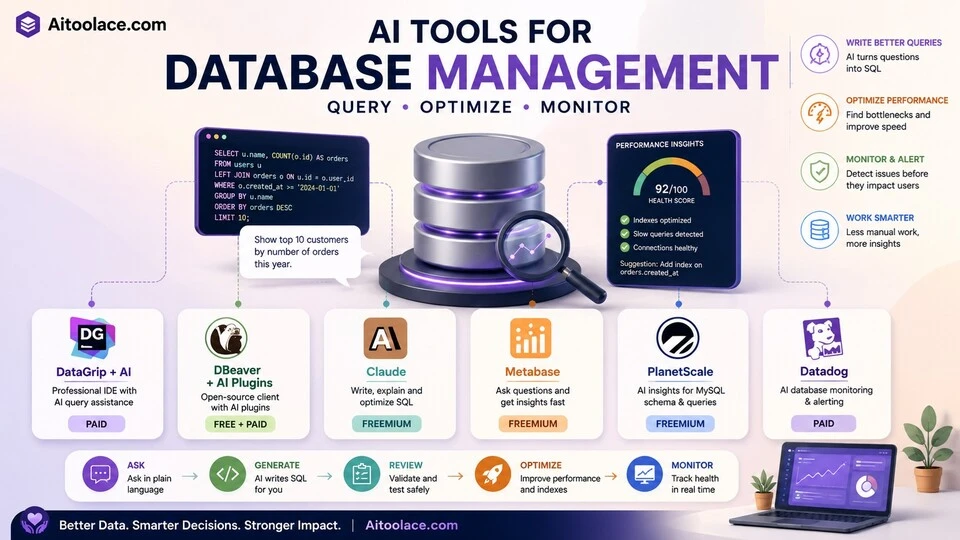
AI tools help by translating natural language into SQL, identifying performance bottlenecks, suggesting index optimizations, and monitoring database health continuously. They don’t replace a skilled DBA for complex architecture decisions, but they make it practical for developers and analysts to work with databases competently without years of specialized training.
The risk is significant: a bad query can lock a production database, corrupt data, or expose sensitive information. AI-generated SQL that looks correct but performs poorly or has unintended side effects is a real danger. Every AI-generated query should be reviewed and tested before running on production data.
For working with data in spreadsheets, Best AI Tools for Spreadsheets & Excel covers that workflow. For data analysis beyond database management, Best AI Tools for Data Analysts addresses the analytical side.
Quick answer: DataGrip with AI is the strongest IDE for database professionals. DBeaver with AI plugins is the best free alternative. Claude is most useful for writing and explaining complex SQL queries.
How I Tested These Tools
I evaluated each tool based on what matters for database work:
- Query generation — can it write correct, efficient SQL from natural language descriptions
- Performance optimization — does it identify slow queries and suggest improvements
- Monitoring — can it track database health and alert you to problems before they cause outages
- Safety — does it help prevent dangerous operations (unfiltered deletes, missing indexes on large tables)
- Database support — does it work with the databases you actually use (PostgreSQL, MySQL, MongoDB, etc.)
I reviewed each tool’s features, tested query generation across different database types, and consulted feedback from developers and DBAs. I did not fabricate performance improvement statistics or invent query optimization benchmarks.
Comparison Table
| Tool | Best For | Key Strength | Pricing |
|---|---|---|---|
| DataGrip + AI | Professional database IDE | Full-featured IDE with AI query assistance | Paid |
| DBeaver + AI | Free database client | Open-source client with community AI plugins | Free + Paid |
| Claude | SQL writing and explanation | Strongest reasoning for complex queries and optimization | Freemium |
| Metabase | Business intelligence queries | Non-technical users querying databases visually | Freemium |
| PlanetScale | MySQL optimization | AI-powered schema insights and query optimization | Freemium |
| Datadog Database Monitoring | Production monitoring | AI-powered database performance monitoring and alerting | Paid |
Best AI Tools for Database Management
DataGrip + AI — Best Professional Database IDE
DataGrip is JetBrains’ dedicated database IDE, and its AI features add intelligent query completion, natural language to SQL conversion, query explanation, and performance suggestions. For developers and DBAs who work with databases daily, DataGrip provides the deepest AI-assisted database experience inside a professional tool.
What it does well:
- provides intelligent SQL completion that understands your schema — suggesting table names, column names, and join conditions based on your actual database structure
- converts natural language descriptions to SQL queries within the context of your specific database schema
- explains existing queries in plain language — useful for understanding complex queries written by others
- identifies potential performance issues in queries before you run them
- supports virtually every database — PostgreSQL, MySQL, SQL Server, Oracle, MongoDB, Redis, and dozens more
Where it falls short: DataGrip is a professional tool with a professional learning curve. Casual database users who run a few queries per week won’t justify the investment in learning the interface. The AI features are helpful additions to an already powerful IDE, but they don’t make DataGrip accessible to non-technical users. The subscription cost adds up alongside other JetBrains tools. And the AI query suggestions, while good, still need review — particularly for complex joins, subqueries, and performance-sensitive operations.
For coding tools beyond databases, see Best AI Tools for Coding.
Best for: developers and DBAs who work with databases daily and want AI assistance integrated into a professional-grade database IDE.
DBeaver + AI — Best Free Database Client
DBeaver is the most popular free, open-source database client. Community AI plugins add natural language to SQL conversion and query assistance — providing meaningful AI capabilities without the cost of commercial tools. For teams on a budget or developers who need a solid database client with some AI help, DBeaver is the strongest free option.
What it does well:
- provides a full-featured database client at no cost — connection management, query editor, data browser, ER diagrams
- community AI plugins add natural language to SQL and query explanation capabilities
- supports a wide range of databases through JDBC drivers
- active open-source community that provides plugins, extensions, and support
- cross-platform — works on Windows, Mac, and Linux
Where it falls short: The AI capabilities in DBeaver depend on community plugins, which vary in quality, reliability, and maintenance. The built-in AI features are less polished than DataGrip’s native integration. The free version (Community Edition) lacks some advanced features available in the paid Enterprise edition. And as an open-source tool, the support model is community-based — you won’t get the enterprise support that commercial tools provide.
Best for: developers and analysts who need a capable database client with some AI assistance and don’t want to pay for a commercial IDE.
Claude — Best for SQL Writing and Explanation
Claude is the most useful tool for the thinking side of database work — writing complex queries, understanding unfamiliar schemas, debugging query errors, and reasoning about database design decisions. You describe what data you need, and Claude writes the SQL with explanations of why each part is structured the way it is.
What it does well:
- writes complex SQL queries from natural language descriptions with clear explanations of the logic
- explains existing queries step by step — useful for understanding inherited code or debugging
- helps with database design decisions — normalization, indexing strategy, schema evolution
- debugs query errors by analyzing error messages and suggesting corrections
- handles different SQL dialects (PostgreSQL, MySQL, SQL Server) and adjusts syntax accordingly
Where it falls short: Claude can’t see your actual database. It writes queries based on the schema you describe, which means miscommunication about table structure produces wrong queries. It can’t run queries, check execution plans, or verify that a query performs well — you need to test that yourself. And Claude’s SQL suggestions, while generally correct, can produce inefficient queries for large datasets because it optimizes for correctness, not for performance against your specific data distribution.
For data analysis using SQL and beyond, see Best AI Tools for Data Analysts.
Best for: developers and analysts who need help writing complex queries, understanding database structures, or reasoning about design decisions — especially those learning SQL or working with unfamiliar databases.
Metabase — Best for Non-Technical Database Queries
Metabase provides a visual interface that lets non-technical users query databases without writing SQL. You select tables, apply filters, choose aggregations, and build charts — all through a point-and-click interface. AI features suggest questions, recommend visualizations, and help users explore data they couldn’t access without SQL knowledge.
What it does well:
- lets non-technical users query databases through a visual interface without writing SQL
- AI suggests questions to ask based on your data structure — helping users discover insights they didn’t know to look for
- creates shareable dashboards that auto-refresh with current data
- supports direct connections to most databases with no data extraction required
- open-source with a generous free plan that covers most team needs
Where it falls short: The visual query builder handles simple to moderate queries well but can’t express the full complexity that SQL allows. Advanced queries (complex joins, window functions, CTEs) still require SQL mode. The AI suggestions are helpful for exploration but tend toward obvious questions rather than genuinely insightful ones. Performance can degrade with large datasets or complex dashboards. And Metabase queries the database directly, which means poorly constructed queries from non-technical users can impact production database performance.
For visualizing data beyond Metabase, see Best AI Tools for Data Visualization.
Best for: organizations where non-technical team members (marketing, sales, operations) need to access database data without relying on developers for every query.
PlanetScale — Best for MySQL Optimization
PlanetScale is a MySQL-compatible database platform that includes AI-powered schema analysis, query optimization suggestions, and performance insights. For teams running MySQL databases, PlanetScale’s AI identifies slow queries, suggests index improvements, and helps optimize schema design.
What it does well:
- analyzes query patterns and suggests specific index additions that would improve performance
- identifies slow queries and explains why they’re slow with specific optimization recommendations
- provides schema insights — identifying unused indexes, missing foreign keys, and design improvements
- handles database branching — you can test schema changes in isolation before applying to production
- serverless scaling that adjusts database resources based on actual usage
Where it falls short: PlanetScale is MySQL-only. PostgreSQL, SQL Server, and MongoDB teams can’t use it. The AI optimization suggestions focus on common performance patterns and may miss optimizations specific to unusual workloads. Database branching is powerful but adds workflow complexity. And PlanetScale’s free tier has been reduced over time — meaningful usage requires a paid plan.
Best for: development teams running MySQL databases that want AI-assisted performance optimization and safe schema management without hiring a dedicated DBA.
Datadog Database Monitoring — Best for Production Monitoring
Datadog’s database monitoring provides continuous, AI-powered observation of your production databases — identifying performance degradation, query anomalies, and resource bottlenecks before they cause user-facing problems.
What it does well:
- monitors database performance continuously and alerts on anomalies — slow queries, connection spikes, resource exhaustion
- AI identifies the root cause of performance issues — whether a slow query, missing index, lock contention, or resource constraint
- correlates database performance with application performance — showing how database issues affect user experience
- supports PostgreSQL, MySQL, SQL Server, and other major databases
- provides historical performance data so you can identify trends and predict future bottlenecks
Where it falls short: Datadog is an infrastructure monitoring platform — it observes and alerts but doesn’t fix problems. You still need database expertise to implement the changes it recommends. The pricing model (per host, per database) can become expensive for organizations with many database instances. And Datadog’s value is primarily for production databases under load — development databases with minimal traffic don’t generate enough data for meaningful AI analysis.
For broader business monitoring, see Best AI Tools for Automating Workflows.
Best for: engineering teams with production databases that need continuous performance monitoring and early warning of issues before they impact users.
The Real Risks of AI in Database Management
1. Running Untested AI-Generated Queries on Production
This is the most dangerous risk. AI-generated SQL can look correct and produce wrong results — or worse, modify data unintentionally. A DELETE without a proper WHERE clause, an UPDATE that matches too many rows, or a query that locks a table for minutes can cause real damage. Always test AI-generated queries on non-production data first. Always review the query logic before running it.
2. Performance Blindness
AI can write a query that returns correct results but performs terribly on large datasets. A query that works fine on 1,000 rows may lock your database when run on 10 million rows. AI tools that don’t consider your data volume and distribution can suggest solutions that create more problems than they solve. Check execution plans for any query that runs on production-scale data.
3. Security Exposure
AI-generated queries that include user input without proper parameterization can create SQL injection vulnerabilities. AI tools sometimes generate queries with hardcoded values rather than parameterized queries, which creates security risks if those patterns are replicated in application code. Ensure every AI-generated query that handles user input uses parameterized queries or prepared statements.
4. Over-Indexing
AI tools that suggest indexes for every slow query can lead to over-indexing — too many indexes slow down write operations and increase storage costs. Each index improves read performance for specific queries but degrades write performance for every insert, update, and delete. Evaluate the tradeoff for each suggested index rather than applying them all.
Which AI Tool Should You Choose?
- Professional database IDE → DataGrip + AI (full-featured IDE with deep AI integration)
- Free database client → DBeaver + AI (open-source with community AI plugins)
- SQL writing and learning → Claude (strongest reasoning for complex queries and explanations)
- Non-technical data access → Metabase (visual queries without SQL)
- MySQL optimization → PlanetScale (AI-powered schema and query optimization)
- Production monitoring → Datadog (continuous performance monitoring with anomaly detection)
Best starting approach: Use Claude for writing and understanding SQL (free). Use DBeaver as your database client (free). Add Metabase when non-technical team members need data access. Scale to DataGrip when you work with databases daily, and add Datadog when your production databases need continuous monitoring.
Frequently Asked Questions
What is the best AI tool for writing SQL?
Claude produces the highest quality SQL with explanations and reasoning. DataGrip provides the best in-editor SQL assistance with schema awareness. For non-technical users, Metabase eliminates the need to write SQL entirely. The right choice depends on your SQL skill level and how you prefer to work.
Can AI replace a database administrator?
For routine tasks (query optimization, index suggestions, monitoring), AI tools handle much of what junior DBAs do. For architecture decisions, capacity planning, disaster recovery, and complex troubleshooting, experienced DBAs remain essential. AI makes developers more self-sufficient with databases but doesn’t eliminate the need for database expertise on important systems.
Is it safe to run AI-generated SQL on production?
Never run AI-generated SQL on production without reviewing it and testing on non-production data first. AI-generated queries can be syntactically correct but logically wrong, performant on small datasets but devastating on large ones, or missing important conditions that protect data integrity. Treat AI SQL like code from a junior developer — review it carefully.
How do I optimize a slow database without a DBA?
Start with the tools that identify the problems: Datadog or PlanetScale for monitoring and optimization suggestions, Claude for understanding and rewriting slow queries. Focus on the highest-impact issues first — usually a few slow queries cause most performance problems. Add indexes that the tools suggest, but test the impact on write performance before applying broadly.
What database does AI support best?
PostgreSQL and MySQL have the most AI tool support because they’re the most widely used open-source databases. SQL Server and Oracle have good support in enterprise tools. MongoDB and other NoSQL databases have less AI tool coverage. Claude handles all SQL dialects well for query writing and explanation.
How much do AI database tools cost?
DBeaver and Metabase are free and open-source. Claude’s free tier handles SQL writing needs. DataGrip costs around $25/month. PlanetScale and Datadog have usage-based pricing that varies by scale. Most small teams can manage databases effectively with free tools plus Claude.
Related AI Tools Guides
- Best AI Tools for Coding
- Best AI Tools for Spreadsheets & Excel
- Best AI Tools for Data Analysts
- Best AI Tools for Data Visualization
- Best AI Tools for Automating Workflows
Explore all AI tools → Browse by profession and use case
Last updated: June 2026