Skip to content
Best AI Tools for Event Planners (Save Time on Proposals & Coordination)
Quick Navigation: How I Tested • Comparison Table • Risks • Best Tools • FAQ
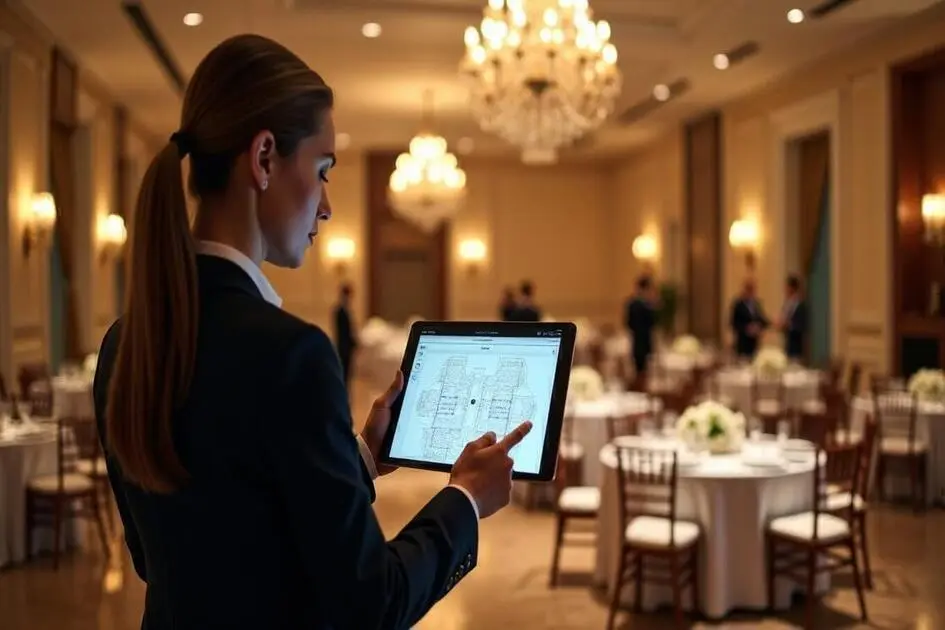
Event planning is a coordination-intensive profession. Every event involves dozens of moving parts — venues, vendors, timelines, budgets, guest lists, menus, floor plans, marketing, and the constant communication that ties it all together. The actual creative work — designing experiences that delight attendees — competes for time with the logistics that make those experiences possible.
AI tools help with the logistics side. They draft proposals, manage communication, create marketing materials, organize timelines, and handle the repetitive coordination tasks that consume most of an event planner’s day. The creative vision, the relationship management, and the on-the-ground problem solving remain entirely human — but the admin burden shrinks significantly.
The approach is similar to how other client-facing professionals use AI — consultants for proposals and documentation, coaches for client management, and freelancers for business operations.
Quick answer: Claude is the most useful tool for proposals, communication, and content creation. Canva AI is best for event marketing materials. Monday.com with AI is strongest for coordinating complex event logistics across teams and vendors.
How I Tested These Tools
I evaluated each tool based on what matters for event planning:
- Proposal quality — can the tool help create professional proposals that win business
- Coordination capability — does it help manage the complexity of multi-vendor, multi-timeline events
- Communication efficiency — does it speed up the constant email and messaging that event planning requires
- Marketing support — can it create promotional materials for events quickly
- Flexibility — does it work for different event types (corporate, weddings, conferences, social)
I reviewed each tool’s features, tested the interfaces across different event planning scenarios, and consulted feedback from practicing event planners. I did not fabricate time-saved statistics or invent client conversion metrics.
Comparison Table
| Tool | Best For | Key Strength | Pricing |
|---|---|---|---|
| Claude | Proposals and communication | High-quality writing for proposals, emails, and content | Freemium |
| Canva AI | Event marketing materials | Professional graphics for invitations, social, and signage | Freemium |
| Monday.com + AI | Event project management | Timeline, vendor, and task coordination with AI | Paid |
| HoneyBook | Client booking flow | Proposals, contracts, and invoicing in one workflow | Paid |
| Zapier AI | Workflow automation | Connect tools and automate repetitive coordination tasks | Freemium |
| ChatGPT | Brainstorming and ideation | Generate theme ideas, agenda options, and creative concepts | Freemium |
Best AI Tools for Event Planners
Claude — Best for Proposals and Communication
Event planners write constantly — proposals, vendor briefs, client updates, attendee communications, post-event reports, and the endless email coordination between all parties. Claude handles the writing workload, producing professional content that you refine rather than write from scratch.
What it does well:
- drafts event proposals with clear scope, timeline, and pricing structure that present professionally
- writes vendor briefs that communicate requirements clearly and completely
- creates attendee communications — invitations, confirmations, updates, follow-ups — with appropriate tone for each event type
- generates post-event reports and summaries from your notes and data
- adapts writing style for different contexts — a corporate conference proposal reads differently from a wedding proposal
Where it falls short: Claude doesn’t know your vendors, your venues, your pricing, or your client relationships. It produces well-structured writing based on the information you provide, but the specific details that make a proposal compelling — your venue knowledge, your vendor relationships, your experience with similar events — need to come from you. And Claude doesn’t manage logistics — it writes about them.
For writing client communications more broadly, see Best AI Tools for Writing Client Emails.
Best for: event planners who spend too much time writing proposals, vendor communications, and client updates — and want to redirect that time toward the creative and coordination work that clients value more.
Canva AI — Best for Event Marketing Materials
Events need visual materials — save-the-dates, invitations, social media posts, event programs, signage, name tags, and post-event galleries. Canva AI provides templates and design tools for all of these, with AI features that speed up production and maintain visual consistency across all event materials.
What it does well:
- provides event-specific templates for every material type — invitations, programs, menus, social posts, signage, presentations
- maintains visual consistency across all event materials through brand kits and style settings
- includes AI features for layout suggestions, text generation, and image enhancement
- supports multiple output formats — print-ready files for physical materials, digital formats for online promotion
- enables rapid iteration when event details change and materials need updating
Where it falls short: Canva’s templates are widely used, which can make your event materials look similar to other events. For high-end events where visual distinction matters, custom design may be necessary. The AI features help with production speed but don’t contribute to creative direction. And Canva handles individual design pieces, not the overall visual strategy for an event — that coherence still requires designer thinking.
For broader design tools, see Best AI Tools for Designers.
Best for: event planners who create their own marketing and event materials and need professional results without a dedicated graphic designer.
Monday.com + AI — Best for Event Project Management
Events are complex projects with interdependent timelines, multiple vendors, evolving requirements, and hard deadlines that can’t slip. Monday.com with AI provides project management specifically suited to this complexity — tracking tasks, dependencies, and status across all workstreams.
What it does well:
- manages multi-workstream event timelines with task dependencies and critical path visibility
- AI suggests task durations and deadlines based on similar past events
- tracks vendor status, deliverables, and communication in one place
- provides dashboards that show overall event readiness across all workstreams
- supports collaboration with vendors and team members through shared boards and updates
Where it falls short: Monday.com is a general project management tool, not an event-specific platform. Setting it up for event planning requires customization — building the right boards, workflows, and automations. The AI features assist with task management but don’t understand event-specific logistics (venue capacity constraints, vendor lead times, seasonal availability). And the platform requires consistent maintenance — if you don’t update task status regularly, the dashboard becomes unreliable.
For automating event coordination workflows, see Best AI Tools for Automating Workflows.
Best for: event planners managing complex events with multiple vendors and workstreams who need clear visibility into overall event readiness and timeline dependencies.
HoneyBook — Best for Client Booking Flow
HoneyBook handles the client transaction from first inquiry to final payment — proposals, contracts, invoicing, and scheduling in one seamless flow. For event planners whose primary business challenge is converting inquiries into booked events, HoneyBook streamlines the process that often loses clients to friction.
What it does well:
- combines inquiry management, proposals, contracts, and invoicing in one client-facing flow
- automates the booking process — proposal approval triggers contract, signed contract triggers invoice
- provides professional-looking proposals with pricing packages that clients can select and approve online
- tracks leads and pipeline so you know which inquiries are likely to convert
- includes AI-assisted proposal writing to speed up the customization for each client
Where it falls short: HoneyBook handles the business transaction but not the event logistics. Once a client is booked, you need separate tools for vendor coordination, timeline management, and event execution. The templates are designed primarily for service businesses (photographers, planners, designers), which works well for wedding and social event planners but less well for corporate event managers. And the platform’s focus on small service businesses means enterprise features are limited.
For invoicing beyond event planning, see Best AI Tools for Invoicing & Billing.
Best for: independent event planners and small firms where converting inquiries into bookings is the primary business challenge — especially wedding and social event planners.
Zapier AI — Best for Workflow Automation
Event planning involves repetitive coordination tasks — sending confirmation emails when vendors are booked, updating spreadsheets when payments arrive, notifying team members when timelines change, and syncing information between the many tools event planners use. Zapier automates these connections.
What it does well:
- connects the various tools event planners use (email, CRM, project management, invoicing, calendars) and automates data flow between them
- eliminates manual tasks like sending confirmation emails, updating tracking spreadsheets, and syncing calendar events
- AI-assisted setup lets you describe automations in plain language
- handles common event coordination workflows — new lead notification, vendor onboarding, payment tracking, RSVP management
Where it falls short: Zapier handles simple automations well but can’t manage the complex, judgment-based coordination that event planning requires. When a vendor cancels two weeks before the event, you need human problem-solving, not an automated workflow. The free plan is limited, and active automations for event businesses add up quickly. And when automations break (which happens when connected tools update), troubleshooting requires technical understanding.
For broader automation tools, see Best AI Tools for Automating Workflows.
Best for: event planners who have repetitive administrative tasks between multiple tools and want to eliminate the manual data transfer that wastes time.
ChatGPT — Best for Brainstorming and Ideation
Event planning requires creative thinking — themes, activities, agenda structures, menu concepts, entertainment options, and the unique touches that make an event memorable. ChatGPT generates ideas quickly across all of these categories, providing raw material for your creative direction.
What it does well:
- generates large numbers of event theme ideas, activity suggestions, and creative concepts quickly
- provides agenda and schedule frameworks for different event types (conferences, galas, retreats, workshops)
- suggests vendor categories and service types you might not have considered for a specific event
- helps with problem-solving when constraints limit your options — “we have half the budget and need to create the same impact”
- works across all event types — corporate, social, wedding, nonprofit, community
Where it falls short: ChatGPT generates ideas based on common event patterns, which means the suggestions tend toward the conventional. Truly distinctive event concepts require human creativity informed by your specific knowledge of the client, the venue, and the occasion. The ideas are starting points for your creative process, not finished concepts. And ChatGPT doesn’t understand the practical constraints of event execution — logistics, budgets, venue limitations — that determine which ideas are actually feasible.
For deeper brainstorming tools, see Best AI Tools for Brainstorming & Ideation.
Best for: event planners who need creative inspiration and want to quickly generate a range of options to present to clients — especially when working across diverse event types.
The Real Risks of AI in Event Planning
1. Over-Automating Client Relationships
Events are personal. Clients choose an event planner because they trust that person to understand their vision and handle the details. Automated emails, AI-generated proposals without personalization, and chatbot responses to client inquiries can undermine the personal relationship that drives repeat business and referrals. Automate the admin, but keep the client relationship genuinely personal.
2. Generic Events from AI Templates
When AI generates event concepts, themes, and agendas, the output reflects common patterns — what’s been done before. Events that feel generic don’t create the memorable experiences that build your reputation. Use AI for initial inspiration, but develop concepts that reflect your creative vision and the client’s specific personality.
3. Coordination Gaps When Automation Fails
Automated workflows are helpful until they break — and in event planning, a broken automation on the day of the event can cause real problems. Always have manual backup processes for critical event-day coordination. Don’t rely solely on automated vendor communications or schedule management for time-sensitive event logistics.
4. Proposal Automation Losing the Personal Touch
AI can generate professional proposals quickly, but the proposals that win business are the ones that demonstrate understanding of the client’s specific needs and vision. A well-written generic proposal loses to a rougher proposal that clearly reflects the client’s unique situation. Use AI for structure and polish, but make sure every proposal contains specific references to the client’s event, preferences, and priorities.
Which AI Tool Should You Choose?
- Proposals and client communication → Claude (professional writing for every event document)
- Event marketing materials → Canva AI (invitations, social posts, programs, signage)
- Complex event coordination → Monday.com + AI (multi-vendor, multi-timeline project management)
- Client booking workflow → HoneyBook (inquiry to payment in one flow)
- Administrative automation → Zapier AI (connect tools and eliminate manual tasks)
- Creative brainstorming → ChatGPT (theme ideas, activities, and creative concepts)
Best starting approach: Start with Claude (proposals and communication) + Canva AI (visual materials) — these cover the two most time-consuming production tasks. Add HoneyBook when your inquiry volume justifies streamlining the booking process. Add Monday.com when your events are complex enough to need formal project management.
Frequently Asked Questions
Can AI replace an event planner?
No. AI handles production tasks — writing proposals, creating materials, automating coordination. The creative vision, vendor relationships, on-site problem-solving, and client management that define great event planning require human judgment and interpersonal skills. AI makes event planners more efficient; it doesn’t make them unnecessary.
How do I use AI without making events feel generic?
Use AI for the mechanical parts (proposal structure, marketing materials, coordination automation) and invest your own creativity in the distinctive elements (theme development, experiential details, personalized touches). The events that stand out are distinguished by the human touches, not by the efficiency of the logistics.
Should I tell clients I use AI tools?
Yes, when relevant. Clients appreciate efficiency — “I use AI to generate concept options so we can explore more directions in less time” is a positive message. Frame AI as a tool that lets you focus more time on the creative and personal aspects of their event, not as a replacement for your expertise.
What’s the biggest time saver for event planners?
Proposal and communication writing — it’s the most time-consuming production task that AI handles well. Reducing proposal writing time from hours to minutes lets you respond to more inquiries and put more time into the events you’ve booked.
Can AI help with day-of event coordination?
In limited ways. AI can generate timelines, checklists, and briefing documents. But real-time event coordination — vendor management, guest handling, problem-solving when things go wrong — requires human presence, judgment, and relationship skills. AI helps you prepare better; it doesn’t manage the event for you.
How much should event planners spend on AI tools?
Start at zero — Claude and Canva both have free tiers that cover basic needs. Add paid tools as your business grows: HoneyBook ($20-40/month) for booking, Monday.com ($10-20/month per user) for project management. Most independent event planners can build an effective AI stack for $50-100/month.
Related AI Tools Guides
- Best AI Tools for Consultants
- Best AI Tools for Freelancers
- Best AI Tools for Coaches
- Best AI Tools for Invoicing & Billing
- Best AI Tools for Automating Workflows
Explore all AI tools → Browse by profession and use case
Last updated: May 2026