Skip to content
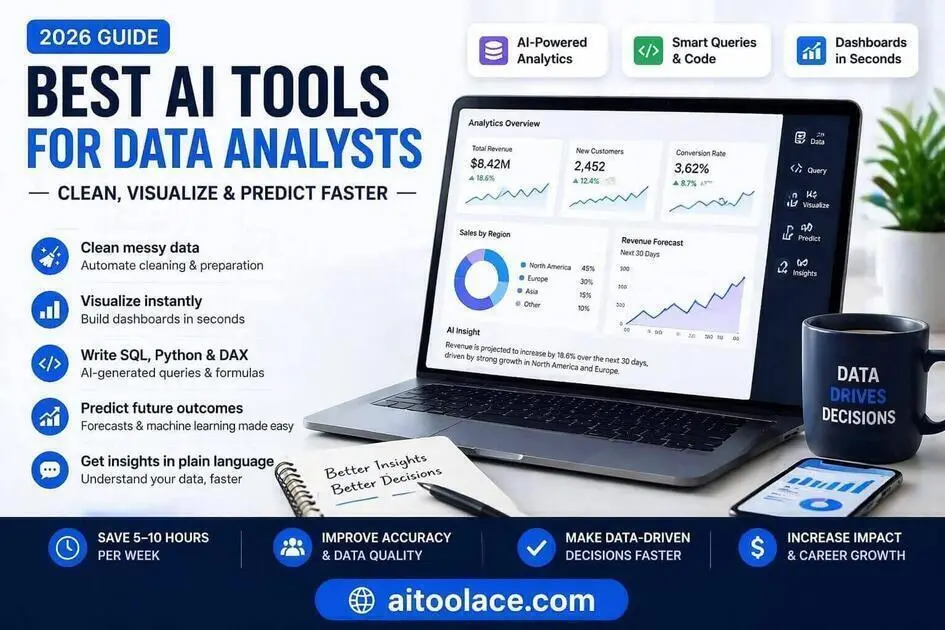
Best AI Tools for Data Analysts in 2026 (Clean, Visualize & Predict Faster)
Quick Navigation: How I Tested • Comparison Table • Risks • Best Tools • FAQ
Data analysts spend a disproportionate amount of their time on work that isn’t analysis — cleaning messy datasets, writing repetitive SQL queries, building dashboards that look like last month’s dashboards, and formatting reports for stakeholders who will glance at them for thirty seconds.
AI tools are genuinely useful here because data work contains a lot of pattern-based, repetitive tasks. Suggesting a SQL query based on a table structure, cleaning inconsistent date formats, or generating a chart from a dataset — these are things AI handles well. The risk is that people treat AI-generated queries and charts as trustworthy by default, when they need the same verification as any other analytical output.
This guide covers the tools that help data analysts work faster without sacrificing the rigor that makes their work valuable. The same principle applies here as in marketing analytics and sales reporting — AI drafts, you verify and interpret.
Quick answer: Hex is the strongest option for collaborative analytics. Power BI + Copilot is best for teams already in the Microsoft ecosystem. DataRobot makes predictive analytics accessible without deep ML expertise.
How I Tested These Tools
I evaluated each tool based on what matters for data analysts:
- Query generation quality — does the AI produce SQL, Python, or DAX that’s actually correct and readable
- Data cleaning capability — how well does it handle messy, real-world datasets with inconsistencies
- Visualization output — are the generated charts and dashboards clear enough for stakeholder consumption
- Collaboration features — can analysts share work with non-technical colleagues effectively
- Data privacy — where does the data go, and what protections are in place
I reviewed each tool’s features, tested the interfaces with sample datasets, and consulted feedback from working data analysts. I did not fabricate time-saved percentages or invent benchmark results.
Comparison Table
| Tool | Best For | Key Strength | Pricing |
|---|---|---|---|
| Hex | Collaborative analytics | SQL + Python + AI + dashboards in one workspace | Freemium |
| Power BI + Copilot | Visualization | Natural language queries inside the Microsoft stack | Freemium + Premium |
| DataRobot | Predictive analytics | Automated ML with model explainability | Paid |
| DataChat | Conversational analysis | Chat-based interface for ad-hoc queries | Freemium |
| Mode | Team analytics | Shared notebooks with governance | Paid |
| Snowflake Cortex | Cloud-native AI | Built-in ML functions inside the data warehouse | Paid |
| Zapier + AI | Data workflows | Light automation for data routing between tools | Freemium + Paid |
The Real Risks of Using AI for Data Analysis
1. Incorrect Logic That Looks Correct
This is the most dangerous risk. AI-generated SQL or Python can produce results that look plausible but contain subtle errors — wrong joins, incorrect aggregation, missing filters. The output often looks clean and professional, which makes it harder to question. Always validate AI-generated queries against a known sample or expected result before using them in reports.
2. Over-Simplified Insights
AI tools that generate “top insights” or automated summaries tend to oversimplify complex business realities. A chart showing revenue growth doesn’t capture the context behind it — one-time deals, seasonal patterns, or accounting changes. Stakeholders who rely on AI-generated summaries without analyst interpretation make worse decisions, not better ones.
3. Confidential Data Exposure
Data analysts routinely work with sensitive information — PII, financial records, HR data, customer behavior. Uploading this data to free AI tools with unclear privacy policies creates real compliance risks. Use paid tools with explicit data governance, or anonymize data before using AI assistance.
4. Erosion of Analytical Thinking
When AI generates the query, builds the chart, and writes the summary, it’s easy for analysts to become editors rather than thinkers. The value of a data analyst isn’t in producing dashboards — it’s in understanding what the data means and what to do about it. AI should handle the mechanical work while the analyst focuses on interpretation and judgment.
Best AI Tools for Data Analysts
Hex — Best for Collaborative Data Analysis
Hex combines SQL, Python, and AI assistance in a single workspace where analysts can query data, build visualizations, and share interactive dashboards with colleagues. It’s designed for the full analytical workflow rather than just one part of it.
What it does well:
- provides an integrated workspace where you write SQL or Python, visualize results, and share dashboards without switching tools
- AI suggests query optimizations, explains complex logic, and generates charts from query results
- supports collaboration — team members can comment on, fork, and build upon shared analyses
- creates interactive dashboards that non-technical stakeholders can filter and explore themselves
Where it falls short: Hex’s AI suggestions are helpful for common queries but struggle with complex, domain-specific logic. If your analysis requires nuanced business rules or unusual data structures, the AI suggestions become less useful and occasionally misleading. The platform also has a learning curve — it’s more powerful than a simple SQL editor, which means it takes longer to become proficient. The free tier is limited, and the paid plans are priced for teams rather than individual analysts.
Best for: data analysts and BI teams who want a unified workspace for querying, visualization, and collaboration, and who work primarily with SQL and Python.
Power BI + Copilot — Best for Visualization
Power BI is already the default visualization tool for organizations in the Microsoft ecosystem. Copilot adds an AI layer that lets you build dashboards, generate DAX formulas, and create visualizations using natural language queries instead of manual configuration.
What it does well:
- lets you describe what you want in plain English (“Show me revenue by region for Q3”) and generates the corresponding visualization
- suggests DAX formulas for calculated measures, which saves time for analysts who don’t write DAX frequently
- integrates naturally with Excel, SQL Server, and other Microsoft data sources
- produces clean, stakeholder-ready dashboards within a familiar interface
Where it falls short: Copilot’s natural language understanding works well for straightforward requests but misinterprets complex or ambiguous queries. If your data model isn’t well-structured, the AI suggestions become unreliable. The feature also requires Microsoft 365 Enterprise licensing, which adds significant cost on top of Power BI. And while Copilot can build a dashboard, it can’t tell you whether the dashboard is showing the right thing — that judgment still falls on the analyst.
Best for: analysts and BI teams already working within the Microsoft ecosystem who want to speed up dashboard creation and DAX writing.
DataRobot — Best for Predictive Analytics
DataRobot makes machine learning accessible to data analysts who understand data but aren’t ML engineers. It automates model selection, training, and evaluation — you provide the data and the question, and it tests multiple models and recommends the best one with explanations.
What it does well:
- automates the process of testing multiple ML models against your data and selecting the best performer
- provides model explainability features that help you understand why the model makes specific predictions
- handles common analytical use cases (churn prediction, forecasting, classification) without requiring ML expertise
- generates documentation and visualizations that help explain model outputs to stakeholders
Where it falls short: DataRobot makes ML accessible, but it doesn’t make it foolproof. The models are only as good as the data you provide, and the platform can’t tell you whether your data is actually suitable for the prediction you’re trying to make. Garbage in, garbage out applies fully. The platform is also enterprise-priced, which puts it out of reach for individual analysts or small teams. And while the explainability features are better than black-box alternatives, they still require statistical understanding to interpret correctly.
Best for: data analysts who need to add predictive capabilities to their work without becoming ML specialists.
DataChat — Best for Conversational Analysis
DataChat lets you interact with your data through a chat interface. Instead of writing SQL or building pivot tables, you type questions in natural language and get tables, charts, and statistical outputs in return. It’s designed for the workflow where someone asks you an ad-hoc question and you need an answer quickly.
What it does well:
- converts natural language questions into SQL, Python, or statistical analysis automatically
- produces charts and tables directly from conversational queries
- makes data accessible to people who can’t write queries themselves
- handles ad-hoc analysis requests faster than traditional query-writing workflows
Where it falls short: Natural language is inherently ambiguous, and DataChat sometimes interprets questions differently than you intended. The query “show me top customers” could mean highest revenue, most orders, or most recent — and the tool has to guess. For complex multi-step analyses, the conversational interface becomes limiting compared to writing actual code. The tool is also most useful for structured, well-organized data — messy datasets produce unreliable results.
Best for: analysts who handle frequent ad-hoc data requests and want to reduce the time spent on routine queries.
Mode — Best for Team Analytics
Mode provides a shared workspace where analysts write SQL and Python notebooks that non-technical team members can interact with through dashboards and reports. The key value is governance — analyses are version-controlled, documented, and reusable.
What it does well:
- provides a shared analytical workspace where queries and notebooks are organized, versioned, and discoverable
- separates the analytical layer (SQL/Python notebooks) from the consumption layer (interactive dashboards)
- allows non-technical users to refresh data, apply filters, and export reports without touching queries
- supports governance and documentation so analyses are transparent and reproducible
Where it falls short: Mode is built for teams, not individuals. If you’re a solo analyst, the collaboration features don’t add value. The interface is functional but not as polished as newer tools like Hex. Setting up the data connections and workspace structure requires upfront investment. And while Mode supports Python notebooks, the AI assistance features are less developed than Hex’s.
Best for: data teams in organizations that need governed, shareable analytical workflows with clear separation between analysts and consumers.
Snowflake Cortex — Best for Cloud-Native AI
Snowflake Cortex adds ML functions directly into the Snowflake data warehouse. Instead of exporting data to a separate ML platform, you run predictions, anomaly detection, and text analysis inside your existing SQL queries.
What it does well:
- runs ML functions (prediction, classification, anomaly detection) directly in SQL within the Snowflake environment
- eliminates the need to export data to a separate ML platform, which simplifies architecture and reduces data movement
- integrates with existing Snowflake governance and security controls
- makes ML accessible to analysts who are comfortable with SQL but not Python or R
Where it falls short: Cortex is only available within Snowflake, so it’s not an option if your data warehouse is elsewhere. The ML capabilities are useful but more limited than dedicated platforms like DataRobot. The functions work well for common use cases but lack the customization available in full ML environments. And because everything runs inside Snowflake, the costs are tied to Snowflake’s compute billing, which can be unpredictable for compute-intensive ML operations.
Best for: data teams that already use Snowflake and want to add ML capabilities without introducing a separate platform.
Zapier + AI — Best for Light Data Automation
Zapier isn’t an analytics tool, but its AI-powered actions solve a common analyst pain point: getting clean data into the right place without manual intervention. It routes data between tools, parses files, and cleans fields automatically.
What it does well:
- automates data movement between business tools (email attachments to databases, form submissions to spreadsheets, CRM updates to reports)
- uses AI to parse and clean incoming data before it reaches your analytical tools
- handles the “last mile” problem where data arrives in messy formats that need standardization
- requires no coding — automations are built through a visual interface
Where it falls short: Zapier handles simple, linear data workflows well but isn’t designed for complex transformations or large datasets. If your data pipeline requires joins, aggregations, or statistical processing, you need actual ETL tools, not Zapier. The AI parsing features are useful for simple formatting but unreliable for complex data structures. And the free tier is limited — active automations add up quickly on paid plans.
Best for: analysts who waste time on manual data collection and formatting and want to automate the ingestion of clean data into their analytical tools.
Which AI Tool Should You Choose?
- Collaborative analytics workspace → Hex (SQL + Python + AI + dashboards)
- Microsoft ecosystem visualization → Power BI + Copilot (natural language dashboards)
- Predictive analytics without ML expertise → DataRobot (automated model building)
- Conversational ad-hoc analysis → DataChat (natural language queries)
- Team-based governed analytics → Mode (shared notebooks + dashboards)
- Cloud-native ML inside your warehouse → Snowflake Cortex (SQL-based ML functions)
- Data ingestion and cleanup automation → Zapier + AI (route and clean data between tools)
For most analysts starting with AI tools, Hex is the strongest single platform because it covers the widest range of analytical workflows. Add specialized tools when you identify specific gaps.
Frequently Asked Questions
Will stakeholders notice that AI assisted the analysis?
Not if the output is accurate and well-presented. What stakeholders notice is wrong numbers, confusing charts, and unexplained conclusions — regardless of whether AI was involved. The quality standard doesn’t change because AI helped produce it.
Is it safe to use AI tools with sensitive business data?
It depends on the tool and the data. Paid platforms with enterprise security features (Hex, Snowflake Cortex, DataRobot) provide appropriate data governance. Free tools and consumer-grade AI chatbots generally don’t provide sufficient protection for sensitive business data. Always check the data processing policies before uploading anything confidential.
Can AI replace data analysts?
No. AI automates the mechanical parts of analysis — query writing, data cleaning, chart generation. The valuable parts — understanding what questions to ask, interpreting results in business context, communicating insights persuasively, and making recommendations — require human judgment and domain knowledge that AI doesn’t have.
Should I use AI for every analysis?
No. For simple lookups and familiar queries, writing the SQL yourself is often faster than explaining what you want to an AI tool. AI adds the most value for complex or unfamiliar queries, exploratory analysis, and tasks that involve a lot of repetitive formatting or visualization work.
How do I convince my team to adopt AI analytics tools?
Start with a specific, visible pain point — the weekly report that takes too long, the recurring data request that eats hours, the dashboard that breaks every month. Demonstrate the improvement on that one use case. Broad “we should use AI” arguments create resistance; specific “this saves us 3 hours on the monthly report” arguments don’t.
What’s the biggest mistake analysts make with AI tools?
Trusting the output without verification. AI-generated SQL can produce results that look correct but contain subtle logical errors. The most common failure is when an analyst shares an AI-generated analysis without checking the underlying logic, and a stakeholder finds an error that undermines trust in all future analyses. Always verify before sharing.
Related AI Tools Guides
- Best AI Tools for Marketers
- Best AI Tools for Sales Teams
- Best AI Writing Tools
- Best AI Tools for Project Managers
- Best AI Tools for HR Managers
Explore all AI tools → Browse by profession and use case
Last updated: April 2026