Skip to content
Best AI Tools for Podcast Marketing (Grow Your Audience in 2026)
Quick Navigation: How I Tested • Comparison Table • Risks • Best Tools • FAQ
Most podcasters are good at making podcasts and bad at marketing them. Recording, editing, and publishing an episode is a creative process that podcasters enjoy. Promoting that episode — writing show notes, creating social clips, posting consistently, building an email list, optimizing for discovery — is marketing work that most podcasters either skip or do inconsistently.
The result is that excellent podcasts go unheard. The content is great but the audience never finds it because the podcaster published the episode and moved on to recording the next one. Discovery doesn’t happen passively — listeners don’t stumble onto podcasts the way they stumble onto YouTube videos or blog posts. Podcast growth requires intentional, consistent marketing.
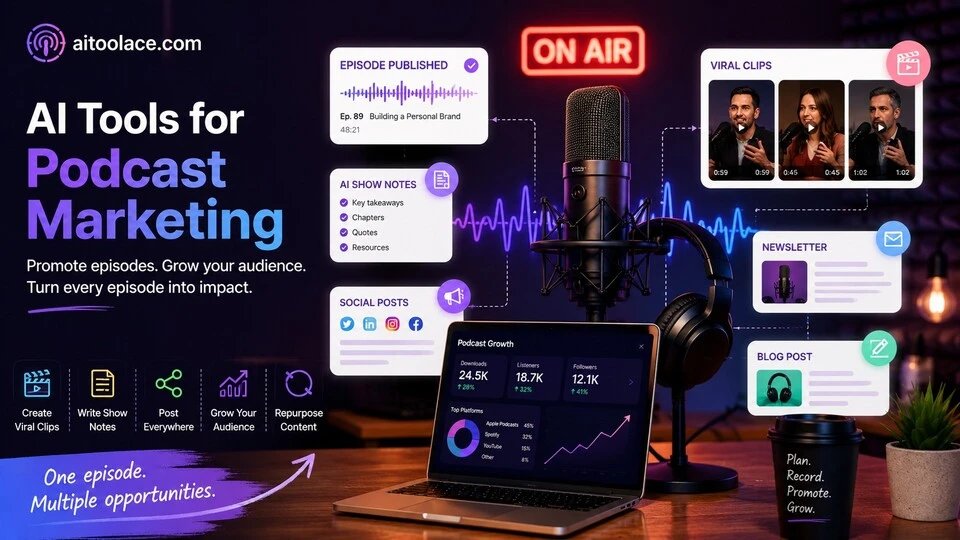
AI tools make podcast marketing practical by automating the promotional work that follows every episode. They generate show notes, create audiogram clips, write social posts, produce newsletter content, and repurpose episode content into blog posts and articles — turning each episode into a multi-channel marketing campaign without adding hours to your workflow.
For podcast production (recording, editing, publishing), Best AI Tools for Podcast Production covers the creation side. For social media growth strategies, Best AI Tools for Social Media Growth addresses platform-specific audience building.
Quick answer: Opus Clip is the best tool for creating viral short clips from episodes. Claude is most useful for show notes, newsletters, and written content from episodes. Headliner is best for creating audiograms and video clips for social platforms.
How I Tested These Tools
I evaluated each tool based on what matters for podcast marketing:
- Content repurposing — can it turn a single episode into multiple promotional assets efficiently
- Clip creation — does it identify the most engaging moments and create shareable short clips
- Written content — can it generate show notes, blog posts, and social posts from episode content
- Distribution support — does it help you promote across platforms (social media, email, web) consistently
- Time efficiency — does the marketing workflow add minutes rather than hours to each episode
I reviewed each tool’s features, tested across different podcast formats, and consulted feedback from podcasters and podcast marketers. I did not fabricate audience growth statistics or invent engagement metrics.
Comparison Table
| Tool | Best For | Key Strength | Pricing |
|---|---|---|---|
| Opus Clip | Short clip creation | AI-selected highlights from episodes for social platforms | Freemium |
| Claude | Written promotional content | Show notes, blog posts, newsletters, and social copy | Freemium |
| Headliner | Audiograms and video clips | Visual audio clips optimized for social sharing | Freemium |
| Castmagic | Episode content extraction | Transcripts, show notes, and social posts from audio | Paid |
| Podcastle | All-in-one podcast platform | Recording, editing, and marketing in one tool | Freemium |
| Buzzsprout | Podcast hosting with marketing | Distribution, analytics, and promotional tools built into hosting | Paid |
Best AI Tools for Podcast Marketing
Opus Clip — Best for Short Clip Creation
Podcast episodes are long. Social media attention spans are short. Opus Clip bridges this gap by analyzing your full episode and identifying the moments most likely to perform as standalone short clips — then formatting them for TikTok, Reels, Shorts, and other vertical platforms with captions and visual formatting.
What it does well:
- analyzes full episodes and identifies the most engaging segments automatically — strong opinions, surprising insights, emotional moments, clear takeaways
- formats clips for vertical social platforms with correct dimensions, captions, and visual styling
- generates multiple clips from a single episode — maximizing the promotional content from each recording
- adds auto-captions in engaging styles that match social media trends
- supports both video podcast episodes and audio-only episodes (with waveform visualization)
Where it falls short: Opus Clip selects clips based on engagement patterns (clear statements, emotional delivery, topic transitions), not on strategic marketing value. The most engaging 60 seconds might not be the best representation of the episode’s value. You should review and curate the output rather than publishing every clip the AI generates. The tool works best with conversational podcasts where distinct moments are identifiable — heavily produced or narrative podcasts don’t clip as cleanly. And the free tier limits the number of clips generated per month.
For video editing broadly, see Best AI Tools for Video Editing.
Best for: podcasters who want to create short-form social content from their episodes without manually scrubbing through audio to find clip-worthy moments.
Claude — Best for Written Promotional Content
Every episode generates a need for written content — show notes for the episode page, social media posts for promotion, newsletter content for subscribers, blog posts for SEO, and guest bios for cross-promotion. Claude produces all of this from a transcript or detailed description of the episode, turning one recording session into a full content library.
What it does well:
- generates comprehensive show notes with timestamps, key topics, guest information, and links
- writes social media posts adapted for each platform — longer LinkedIn posts, punchy Twitter threads, engaging Instagram captions
- creates newsletter content that summarizes the episode and drives listens from your email list
- produces SEO-optimized blog posts derived from episode content — extending your podcast’s discoverability beyond audio platforms
- drafts guest outreach and cross-promotion messages for building partnerships with other podcasters
Where it falls short: Claude works from text — you need to provide a transcript, detailed notes, or a thorough description of the episode. Without this input, the output is generic. Claude doesn’t listen to your audio, so the written content captures information but not the energy and personality of the actual conversation. And Claude generates the content but doesn’t publish it — you still need to post, schedule, and distribute across platforms manually or with scheduling tools.
For content repurposing strategies, see Best AI Tools for Content Repurposing.
Best for: podcasters who want professional written content for every episode — especially those who want blog posts and SEO content derived from their episodes to improve discoverability.
Headliner — Best for Audiograms and Video Clips
Audiograms — short video clips with audio waveforms and captions — are one of the most effective podcast promotional formats on social media. Headliner creates these audiograms quickly, adding visual elements that make audio content scroll-stopping in visual-first social feeds.
What it does well:
- creates audiograms with customizable waveform visualizations, captions, and background images
- supports multiple aspect ratios and formats for different platforms (square for Instagram, vertical for Stories/Reels, landscape for Twitter/LinkedIn)
- auto-generates captions with editable text and styling options
- provides templates designed specifically for podcast promotion
- includes basic video editing for podcasters who record video alongside audio
Where it falls short: Audiograms are effective for podcast promotion but the format is becoming common — every podcast on social media uses similar audiogram styles. Standing out requires creative visual choices beyond the default templates. Headliner’s editing capabilities are basic compared to dedicated video editors. And audiograms work best for short, impactful segments — they’re less effective for complex topics that need longer explanation.
For broader video content creation, see Best AI Tools for Video Editing.
Best for: podcasters who want visual social media content from their audio episodes — especially audio-only podcasters who need visual assets for platforms that prioritize video.
Castmagic — Best for Episode Content Extraction
Castmagic takes your podcast episode and extracts everything you need for marketing — transcripts, show notes, timestamps, key quotes, social posts, email copy, and blog post drafts. Instead of using separate tools for each content type, Castmagic handles the complete extraction pipeline from a single audio upload.
What it does well:
- extracts multiple content types from a single audio upload — transcripts, show notes, social posts, newsletter content, blog drafts
- generates timestamped show notes automatically so listeners can jump to topics that interest them
- identifies key quotes and takeaways that work as standalone social content
- produces content in multiple formats simultaneously — saving the time of using separate tools for each
- supports custom extraction templates so you define exactly what content you want from each episode
Where it falls short: Castmagic produces quantity efficiently but the quality of individual outputs varies. The show notes are reliable, social posts are adequate starting points, and blog drafts need significant editing to be publishable. You’ll still need to review and refine the output — the automation produces first drafts, not finished content. The transcription accuracy depends on audio quality and speaker clarity. And the platform is podcast-specific — it doesn’t help with non-podcast content marketing.
For transcription tools, see Best AI Tools for Transcription.
Best for: podcasters who want a single tool that extracts all promotional content from each episode — especially those who currently skip marketing because it takes too much time after recording and editing.
Podcastle — Best All-in-One Podcast Platform
Podcastle combines recording, editing, and marketing in one platform — AI-powered audio editing, noise removal, voice enhancement alongside social clip creation, show notes generation, and distribution features. For podcasters who want one tool for everything, Podcastle reduces the tool sprawl that makes podcasting operationally complex.
What it does well:
- combines recording, editing, and marketing in one platform — reducing the number of tools in your workflow
- AI audio enhancement improves recording quality — noise removal, voice leveling, filler word removal
- generates show notes and transcripts from published episodes automatically
- creates social clips with captions for promoting episodes across platforms
- supports remote recording with separate audio tracks for multi-guest episodes
Where it falls short: All-in-one tools make tradeoffs in depth for breadth. Podcastle’s audio editing is good but less powerful than Descript or Adobe Audition. Its marketing features are functional but less capable than dedicated tools like Opus Clip or Castmagic. And the social clip creation is basic compared to tools designed specifically for that purpose. Podcastle is most valuable for podcasters who want simplicity over capability — one decent tool instead of five specialized ones.
For podcast production, see Best AI Tools for Podcast Production.
Best for: podcasters who want to simplify their workflow with one platform — especially new podcasters who don’t want to learn and manage multiple tools.
Buzzsprout — Best Hosting with Marketing Features
Buzzsprout is a podcast hosting platform with built-in marketing tools — automatic episode promotion, AI-generated social posts, detailed analytics, and directory submission. For podcasters who want their hosting platform to handle basic marketing alongside distribution, Buzzsprout provides the most marketing-ready hosting option.
What it does well:
- handles podcast hosting, distribution to all major directories, and basic marketing from one platform
- generates social media posts and audiograms for each published episode automatically
- provides detailed analytics — downloads by episode, listener geography, listening apps, and trends
- includes a website builder for your podcast that displays episodes, show notes, and subscription links
- simplifies directory submission — Apple Podcasts, Spotify, Google, and others from one dashboard
Where it falls short: Buzzsprout’s marketing features are built into a hosting platform, which means they’re functional but basic. The social post generation produces adequate starting points but not distinctive content. The audiograms are simple compared to Headliner’s options. And the analytics, while useful, are less detailed than dedicated analytics tools. Buzzsprout is best for podcasters who want integrated basics rather than best-in-class marketing.
For email marketing to promote podcasts, see Best AI Tools for Email Marketing.
Best for: podcasters who want their hosting platform to include basic marketing features — especially those starting out who don’t want separate tools for hosting and promotion.
The Real Risks of AI Podcast Marketing
1. Quantity Over Quality in Promotion
AI makes it easy to generate dozens of promotional assets per episode. But posting mediocre clips, generic social posts, and AI-generated show notes that sound like every other podcast’s promotion doesn’t build an audience — it creates noise. Curate the AI output. Post the best three clips, not all fifteen. Edit the social posts to add your voice. Quality promotion grows audiences; quantity promotion gets ignored.
2. Clips That Misrepresent the Episode
AI selects clips based on engagement patterns — dramatic statements, strong opinions, emotional moments. These moments may not represent the episode’s actual value or may be taken out of context. A clip where you say something provocative to set up a nuanced discussion looks different as a standalone clip where the nuance is missing. Review clips for context, not just engagement potential.
3. Neglecting the Actual Podcast
Marketing is important, but it’s secondary to the content. AI-powered marketing that runs smoothly can create a false sense that the podcast is growing, even when the episodes themselves need improvement. Listener growth ultimately depends on episode quality — marketing brings listeners, but content keeps them. Don’t let efficient marketing distract from investing in better episodes.
4. Platform Dependence for Discovery
Social media clips drive podcast discovery, but platforms change algorithms, reduce organic reach, and deprioritize external links. Building your podcast marketing entirely on social platform discovery creates vulnerability. Diversify: build an email list (you own it), optimize for podcast search (episode titles, descriptions), and create web content (blog posts from episodes for SEO).
Which AI Tool Should You Choose?
- Short clips for social → Opus Clip (AI-selected highlights formatted for social platforms)
- Written promotional content → Claude (show notes, blog posts, newsletters, and social copy)
- Audiograms and visual clips → Headliner (audio waveform videos for social sharing)
- Complete content extraction → Castmagic (all promotional content from one audio upload)
- All-in-one podcast platform → Podcastle (recording, editing, and marketing combined)
- Hosting with marketing → Buzzsprout (distribution, analytics, and basic promotion built into hosting)
Best starting approach: Use Claude (free) for show notes and written content. Add Opus Clip (free tier) for social clips. This covers the two most impactful marketing activities — written content for SEO and discoverability, and video clips for social promotion. Add Castmagic when your episode volume justifies the time savings of automated extraction.
Frequently Asked Questions
What is the best way to market a podcast with AI?
Create three types of promotional content for each episode: short video clips for social media (Opus Clip), written show notes and blog posts for SEO (Claude), and email newsletter content for subscribers (Claude). Consistency matters more than volume — promote every episode with at least one clip and one written post.
How many clips should I create per episode?
Create as many as the AI generates, but publish only the best 2-4 per episode. Posting too many clips from the same episode oversaturates your audience’s feed. Space clips across the days between episodes so you maintain consistent presence without overwhelming followers with the same content.
Should I create a blog post for every episode?
If you want your podcast to be discoverable through search engines, yes. Podcast audio isn’t indexed by search engines — blog posts with episode content are. Even a basic post with show notes, key takeaways, and a transcript excerpt improves your podcast’s searchability significantly.
How important are show notes for podcast marketing?
Show notes serve multiple purposes: they improve SEO (searchable text about your episode topics), they help potential listeners decide whether to listen (a scannable summary is faster than sampling 60 minutes of audio), and they provide links and resources mentioned in the episode. Good show notes are one of the highest-ROI marketing investments per episode.
Can AI replace a podcast marketing team?
For solo podcasters and small shows, AI tools handle the marketing work that would otherwise require a dedicated marketer. For larger shows with revenue goals, AI tools augment a marketing team by accelerating content production — but strategy, community management, and partnership development still require human judgment. AI handles production; humans handle strategy and relationships.
How long should I spend marketing each episode?
With AI tools, you can create a comprehensive promotional package (clips, show notes, social posts, newsletter) in 30-60 minutes per episode. Without AI, the same work takes 2-4 hours. The time savings are the primary value of AI podcast marketing — making consistent promotion practical for time-constrained podcasters.
Related AI Tools Guides
- Best AI Tools for Podcast Production
- Best AI Tools for Social Media Growth
- Best AI Tools for Content Repurposing
- Best AI Tools for Video Editing
- Best AI Tools for Email Marketing
Explore all AI tools → Browse by profession and use case
Last updated: July 2026