Skip to content
Best AI Tools for Proposal Writing (Win More Business in 2026)
Quick Navigation: How I Tested • Comparison Table • Risks • Best Tools • FAQ
Proposals are where opportunities become revenue — or don’t. A well-written proposal that clearly articulates the problem, presents a credible solution, and justifies the investment wins business. A generic proposal that could have been sent to anyone gets filed away and forgotten.
The challenge is that writing good proposals takes time. Understanding the client’s situation, structuring the argument, describing the approach, defining deliverables, and presenting pricing all require careful thought and clear writing. Most professionals either rush proposals (and lose deals) or spend too long on them (and lose capacity for other work).
AI tools help by handling the structural and mechanical parts of proposal writing. They generate first drafts from brief descriptions, maintain consistent formatting across proposals, personalize templates for specific clients, and produce professional output faster than starting from a blank page. The strategic thinking — understanding what the client actually needs and why your approach is the right one — remains yours.
For consultants who write proposals frequently, Best AI Tools for Consultants covers the broader consulting workflow. For the contract that follows a won proposal, Best AI Tools for Contracts & Legal Documents addresses the next step.
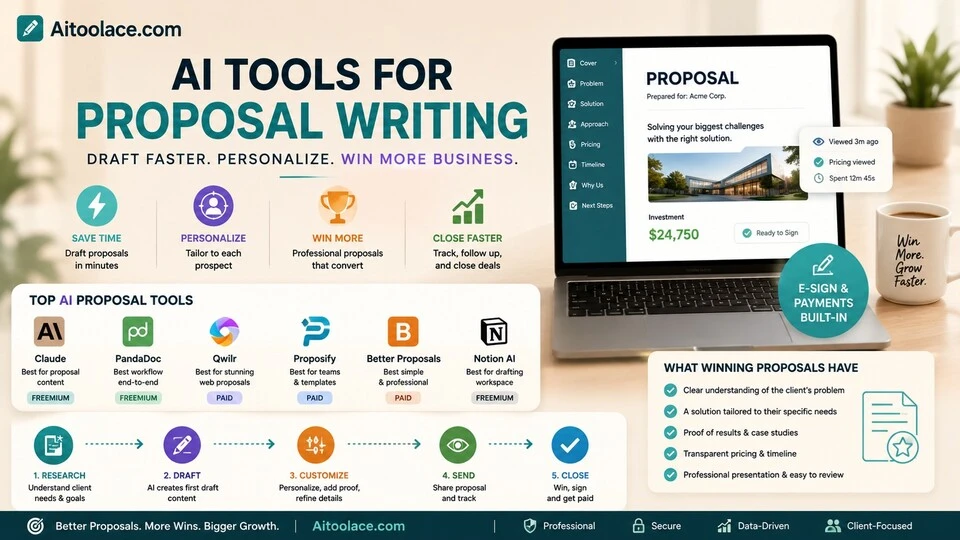
Quick answer: Claude produces the highest quality proposal content. PandaDoc provides the best proposal-to-signature workflow. Qwilr creates the most visually impressive web-based proposals.
How I Tested These Tools
I evaluated each tool based on what matters for winning proposals:
- Content quality — does the proposal read persuasively and professionally, not like a generic template
- Personalization — can it adapt to each client’s specific situation rather than producing one-size-fits-all output
- Speed — how much faster is the process compared to writing from scratch
- Client experience — does the proposal format make it easy for the client to review, approve, and sign
- Conversion support — does the tool help you track engagement and follow up at the right time
I reviewed each tool’s features, tested proposal generation across different industries, and consulted feedback from sales professionals and consultants. I did not fabricate win rate statistics or invent conversion improvements.
Comparison Table
| Tool | Best For | Key Strength | Pricing |
|---|---|---|---|
| Claude | Proposal content writing | Highest quality persuasive writing with strategic depth | Freemium |
| PandaDoc | Proposal-to-signature workflow | Proposals, contracts, and e-signatures in one platform | Freemium |
| Qwilr | Web-based proposals | Interactive, visually impressive online proposals | Paid |
| Proposify | Team proposal management | Templates, approval workflows, and analytics for teams | Paid |
| Better Proposals | Simple professional proposals | Clean templates with built-in payment acceptance | Paid |
| Notion AI | Proposal drafting workspace | Draft and organize proposals in a flexible workspace | Freemium |
Best AI Tools for Proposal Writing
Claude — Best Proposal Content Writing
The words in your proposal determine whether you win or lose the deal. Claude produces proposal content that’s persuasive, specific, and professional — articulating problems clearly, presenting solutions credibly, and justifying investment convincingly. Unlike template-based tools, Claude adapts the argument structure and language to each client’s specific situation.
What it does well:
- writes proposal narratives that connect the client’s problem to your solution with clear, logical reasoning
- adapts tone, depth, and emphasis for different audiences — an executive summary reads differently from a technical approach section
- generates multiple proposal approaches so you can choose the strongest angle for each opportunity
- handles the hardest parts of proposal writing — executive summaries, value propositions, and pricing justifications
- produces sections you can paste into any proposal tool or format — the content is tool-agnostic
Where it falls short: Claude writes the content but doesn’t handle the presentation. You need a separate tool (PandaDoc, Qwilr, or even a Word template) to format, design, and deliver the proposal. Claude also doesn’t know your services, your pricing, your case studies, or your competitive position — you need to provide this context for personalized output. And Claude can’t track whether the client opened the proposal, which pages they spent time on, or when to follow up — those features require proposal platforms.
For writing client communications beyond proposals, see Best AI Tools for Writing Client Emails.
Best for: professionals who write proposals regularly and need higher quality content faster — consultants, agencies, freelancers, and anyone where the written argument determines whether they win the business.
PandaDoc — Best Proposal-to-Signature Workflow
PandaDoc handles the entire proposal lifecycle — drafting, sending, tracking, signing, and payment — in one platform. Instead of creating a proposal in Word, sending it as a PDF, tracking it manually, and using a separate tool for signatures, PandaDoc streamlines the complete process.
What it does well:
- combines proposal creation, electronic signatures, and payment acceptance in one seamless workflow
- AI assists with content generation — suggesting sections, writing descriptions, and populating templates
- tracks client engagement — shows when the proposal was opened, which pages were viewed, and how long the client spent on each section
- supports interactive pricing tables where clients can select options and see the total adjust
- integrates with CRM tools so proposal status feeds into your sales pipeline
Where it falls short: PandaDoc’s AI content generation is functional but not as polished as Claude for high-stakes proposals. The templates provide structure but can feel rigid for proposals that don’t fit standard formats. The tracking features are valuable but can create anxiety — checking engagement every hour doesn’t improve your win rate. And PandaDoc is a platform commitment — migrating proposals to or from the system takes effort.
For the contract stage after proposals, see Best AI Tools for Contracts & Legal Documents.
Best for: sales teams and service businesses that send proposals regularly and want tracking, signatures, and payment in one system — especially those where proposal-to-close speed matters.
Qwilr — Best for Web-Based Proposals
Qwilr takes proposals out of PDF and into interactive web pages. Instead of sending a static document, you send a link to a beautifully designed web page with embedded videos, interactive pricing, and live content. For businesses where visual impression matters, Qwilr proposals stand out from the stack of PDF attachments competitors send.
What it does well:
- creates interactive, web-based proposals that look significantly more impressive than PDF documents
- supports embedded video, interactive pricing tables, and dynamic content within the proposal
- provides engagement analytics — which sections the client viewed, for how long, and how many times
- includes electronic acceptance and payment integration so clients can approve and pay from the proposal
- AI assists with content suggestions and layout optimization
Where it falls short: Web-based proposals require the client to click a link and view online, which doesn’t work for all audiences — some clients prefer downloadable documents they can review offline, print, or share internally. The visual focus can distract from the content if the proposal looks impressive but doesn’t make a compelling argument. Qwilr is also more expensive than simpler proposal tools, and the value is primarily in the presentation format — if your clients don’t care about visual design, simpler tools deliver the same results.
For presentation design broadly, see Best AI Tools for Presentations.
Best for: agencies, design firms, and service businesses where visual presentation is part of the value proposition — especially when competing against firms that send generic PDF proposals.
Proposify — Best for Team Proposal Management
Proposify is designed for teams that produce many proposals and need consistency, oversight, and analytics across the entire proposal operation. It provides templates, content libraries, approval workflows, and performance analytics that help sales teams produce better proposals more efficiently.
What it does well:
- provides a content library of approved sections, case studies, and pricing that team members can assemble into proposals
- enforces brand and messaging consistency across all proposals from all team members
- includes approval workflows so managers review proposals before they reach clients
- tracks proposal performance — win rates by template, by team member, by industry — to identify what works
- supports team collaboration with commenting, version control, and assignment features
Where it falls short: Proposify is built for teams, not individuals. Solo consultants and freelancers don’t benefit from the team management features and pay for capability they don’t use. Setting up the content library and templates requires upfront investment — the system works best after you’ve built a library of reusable components. And the AI features are focused on assembly and optimization rather than original writing — you need the content to exist before Proposify helps you organize it.
For managing sales teams, see Best AI Tools for Sales Teams.
Best for: sales teams with multiple proposal writers who need consistent quality, brand compliance, and performance visibility across all proposals.
Better Proposals — Best for Simple Professional Proposals
Better Proposals provides clean, professional proposal templates with built-in tracking, signatures, and payment — without the complexity of enterprise tools. For freelancers and small businesses that need professional proposals quickly, Better Proposals delivers the essentials without overwhelming features.
What it does well:
- provides clean, professionally designed proposal templates that look polished immediately
- includes built-in tracking (opens, views, time spent), electronic signatures, and payment acceptance
- simple interface that doesn’t require training — create a proposal in minutes, not hours
- supports payment integration so clients can pay a deposit directly from the proposal
- affordable pricing appropriate for freelancers and small businesses
Where it falls short: Simplicity limits customization. The templates are professional but constraining — if your proposal doesn’t fit the template structure, the tool becomes frustrating rather than helpful. The AI features are minimal compared to Claude or PandaDoc. And Better Proposals is a delivery tool, not a writing tool — it formats and sends your content professionally, but the content itself needs to come from you or from a writing tool like Claude.
For freelancer business tools, see Best AI Tools for Freelancers.
Best for: freelancers and small businesses that need simple, professional proposals with tracking and payment — without enterprise complexity or pricing.
Notion AI — Best for Proposal Drafting Workspace
Notion AI provides a flexible workspace for drafting, organizing, and iterating on proposals. The AI generates first drafts from outlines, reorganizes sections, and helps develop arguments — all within a workspace where your templates, case studies, and past proposals are accessible.
What it does well:
- provides a flexible drafting environment where proposals develop iteratively alongside supporting research and notes
- AI generates first drafts from outlines or brief descriptions of the opportunity
- templates standardize your proposal structure while allowing customization for each client
- past proposals are searchable and reusable — sections from previous winners can be adapted for new opportunities
- supports collaboration if multiple team members contribute to proposals
Where it falls short: Notion is a drafting workspace, not a proposal delivery tool. You still need to export the content into a presentation format (PandaDoc, Qwilr, PDF) for client delivery. Notion doesn’t provide tracking, signatures, or payment acceptance. The AI writing quality is below Claude’s for persuasive proposal content. And Notion’s flexibility means setup effort — without an organized workspace, proposals get lost among other documents.
For knowledge management broadly, see Best AI Tools for Knowledge Management.
Best for: professionals who draft proposals frequently and want a workspace where proposal development, templates, and past proposals all live together — especially teams already using Notion.
The Real Risks of AI Proposal Writing
1. Generic Proposals That Don’t Win
AI makes it easy to produce proposals quickly, which can lead to sending more proposals with less customization. But win rates depend on quality, not quantity. A proposal that clearly addresses the specific client’s situation beats ten generic proposals sent to different prospects. Use AI speed to improve each proposal, not to send more identical ones.
2. Template Dependence
When every proposal follows the same template with minor customizations, clients notice — especially in competitive situations where they receive multiple proposals. The proposals that win often break the template by addressing something unexpected or presenting the approach in a way the client didn’t expect. Use templates for structure, but add something distinctive to every proposal.
3. Losing the Strategic Narrative
AI can write professional proposal sections, but it can’t develop the strategic narrative that connects the client’s problem to your solution in a way that feels inevitable. The best proposals tell a story — “here’s where you are, here’s where you need to be, and here’s why our approach gets you there better than the alternatives.” AI writes sections; you craft the story.
4. Over-Promising in AI-Generated Content
AI tends toward positive, confident language — which can inadvertently make promises you can’t keep. “We will transform your operations” or “our approach guarantees results” sounds good in a proposal but creates expectations you may not meet. Review AI-generated content critically for claims that exceed what you can deliver.
Which AI Tool Should You Choose?
- Highest quality proposal content → Claude (persuasive writing with strategic depth)
- Proposal-to-signature workflow → PandaDoc (tracking, signatures, and payment in one tool)
- Visually impressive proposals → Qwilr (interactive web-based proposals)
- Team proposal management → Proposify (templates, approval, and analytics for teams)
- Simple professional proposals → Better Proposals (clean templates with tracking)
- Proposal drafting workspace → Notion AI (draft and organize in a flexible workspace)
Best starting approach: Write proposal content in Claude (free), then deliver it through PandaDoc (freemium) or Better Proposals. This separates the writing (where quality matters most) from the delivery (where tracking and signatures matter). Add Proposify when your team is large enough to need consistency management.
Frequently Asked Questions
What is the best AI tool for writing proposals?
Claude produces the highest quality proposal content — persuasive, specific, and adaptable to different clients. PandaDoc is best as a complete proposal platform with AI assistance. The ideal approach is Claude for writing + PandaDoc or Qwilr for delivery and tracking.
Can AI-written proposals actually win business?
AI-drafted proposals that are reviewed, personalized, and enhanced with your specific knowledge win business regularly. Unedited AI proposals that could have been sent to anyone rarely win. The winning factor isn’t whether AI was involved — it’s whether the proposal demonstrates understanding of the client’s specific situation.
How do I personalize AI-generated proposals?
Provide Claude with specific details about the client — their industry, their challenges, their goals, what they’ve tried before, and why they’re evaluating solutions now. The more context you provide, the more personalized the output. Then edit the draft to add references to your specific conversations with the client and relevant case studies from your experience.
Should I use a proposal template or write from scratch?
Templates provide structure and consistency. Writing from scratch allows maximum customization. The best approach is a template structure with custom content — standard sections (executive summary, approach, pricing, timeline) filled with writing tailored to each specific opportunity. AI makes this hybrid approach practical by generating custom content within a consistent structure.
How important is proposal design versus content?
Content wins deals. Design prevents your proposal from being dismissed before the content is read. A beautifully designed proposal with weak content loses to a plain document with a compelling argument. Invest most of your time in content quality and enough time in design to look professional. Don’t let design become a substitute for substance.
How do I track proposal engagement?
PandaDoc, Qwilr, Proposify, and Better Proposals all track when proposals are opened, which pages are viewed, and how long the client spends on each section. Use this data to time your follow-up (reach out when they’ve just reviewed it) and improve future proposals (sections they skip may need rethinking).
Related AI Tools Guides
- Best AI Tools for Consultants
- Best AI Tools for Freelancers
- Best AI Tools for Writing Client Emails
- Best AI Tools for Contracts & Legal Documents
- Best AI Tools for Sales Teams
Explore all AI tools → Browse by profession and use case
Last updated: June 2026