Skip to content
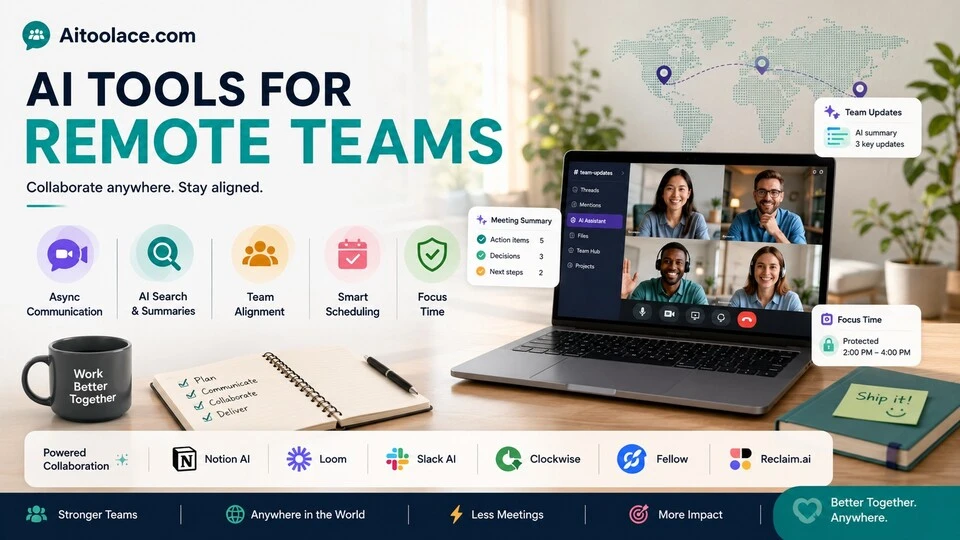
Best AI Tools for Remote Teams (Collaborate Better From Anywhere in 2026)
Quick Navigation: How I Tested • Comparison Table • Risks • Best Tools • FAQ
Remote work has a communication problem that most teams solve badly. Without shared office space, teams default to two extremes: too many meetings (synchronizing everything in real time) or too few touchpoints (people working in isolation without alignment). Both extremes reduce productivity — meetings consume the day, and isolation creates misalignment that takes longer to fix than prevent.
AI tools help remote teams find the middle ground. They summarize meetings for people who couldn’t attend. They keep knowledge searchable instead of buried in chat threads. They automate status updates so people know what’s happening without scheduling another call. And they bridge time zones by making asynchronous communication as effective as synchronous conversation.
The tools below are specifically evaluated for distributed teams — not just collaboration tools that happen to work remotely, but tools that solve problems unique to working across locations and time zones.
For scheduling across time zones, Best AI Tools for Scheduling & Calendar Management covers that specifically. For managing tasks across a distributed team, Best AI Tools for Task Management addresses coordination workflows.
Quick answer: Notion AI is the strongest async workspace for remote teams. Loom + AI is best for replacing meetings with video updates. Slack with AI features is most practical for teams already using Slack.
How I Tested These Tools
I evaluated each tool based on what matters for remote teams specifically:
- Async effectiveness — does the tool make asynchronous communication as productive as real-time conversation
- Time zone friendliness — does it work well when team members are in different time zones
- Context preservation — does information stay findable over time, or disappear into chat history
- Meeting reduction — does it genuinely replace meetings that don’t need to be synchronous
- Team alignment — does it keep everyone informed about what’s happening without constant check-ins
I reviewed each tool’s features, tested across distributed team scenarios, and consulted feedback from remote team managers. I did not fabricate productivity statistics or invent collaboration metrics.
Comparison Table
| Tool | Best For | Key Strength | Pricing |
|---|---|---|---|
| Notion AI | Async workspace | Central knowledge base with AI search and generation | Freemium |
| Loom + AI | Video messaging | Replace meetings with recorded video updates | Freemium |
| Slack + AI | Team communication | AI summaries and search in the tool teams already use | Freemium |
| Clockwise | Time zone scheduling | AI-optimized meeting times across distributed teams | Freemium |
| Fellow | Meeting management | Agendas, notes, and action items for necessary meetings | Freemium |
| Reclaim.ai | Focus time protection | Defend deep work blocks across time zones | Freemium |
Best AI Tools for Remote Teams
Notion AI — Best Async Workspace
Remote teams need a single source of truth — one place where documentation, decisions, project status, and team knowledge live. Notion AI provides this workspace with AI that makes everything searchable, summarizable, and generatable. Instead of asking “where is that document?” or scheduling a meeting to get context, team members search the workspace and get answers.
What it does well:
- centralizes documentation, project tracking, wikis, and meeting notes in one searchable workspace
- AI search finds answers across all content by meaning, not just keywords — “what did we decide about the pricing strategy” finds the answer regardless of where it’s documented
- AI generates meeting notes, project summaries, and status updates from existing workspace content
- supports async collaboration — team members contribute, comment, and review on their own schedule
- flexible enough to serve as project tracker, knowledge base, documentation system, and team wiki simultaneously
Where it falls short: Notion requires intentional setup and ongoing maintenance. Without someone actively organizing the workspace, it becomes a dumping ground that’s harder to navigate than the scattered tools it replaced. The AI search is good but not magic — it finds what’s documented, so undocumented knowledge remains inaccessible. And Notion is a workspace tool, not a communication tool — it doesn’t replace the real-time conversation that some situations require.
For knowledge management broadly, see Best AI Tools for Knowledge Management.
Best for: remote teams that want one central workspace where all documentation, decisions, and project information lives — and where AI makes that information accessible without scheduling meetings.
Loom + AI — Best for Video Messaging
Most meetings could be video messages. A project update, a design review walkthrough, a technical explanation, or a weekly status doesn’t need real-time interaction — it needs clear communication that recipients can watch on their own schedule. Loom lets you record video messages with screen sharing, and AI adds automatic transcription, summaries, and chapters.
What it does well:
- records video messages with screen sharing that replace meetings requiring no real-time discussion
- AI generates automatic transcription, summaries, and chapter markers so recipients can scan or watch selectively
- recipients can respond with comments at specific timestamps rather than scheduling a follow-up meeting
- analytics show who watched, for how long, and which sections — so you know whether your message landed
- works across time zones perfectly — record when it’s convenient for you, watch when it’s convenient for them
Where it falls short: Loom works for one-way communication (updates, explanations, walkthroughs) but not for discussions, brainstorming, or decisions that require back-and-forth. Some team cultures resist video messages — people who prefer reading find video slower than text. The accumulation of unwatched Looms can become its own communication debt. And while Loom reduces meetings, it doesn’t eliminate the need for real-time conversation when genuine discussion is required.
For meeting documentation when meetings are necessary, see Best AI Tools for Meeting Notes.
Best for: remote teams where most meetings are status updates, walkthroughs, or explanations that don’t require real-time interaction — especially teams spread across multiple time zones.
Slack + AI — Best for Team Communication
Most remote teams already use Slack. Its AI features add channel summaries (catch up on what you missed while offline), thread summaries (understand long discussions without reading every message), and intelligent search (find answers from past conversations). For teams already on Slack, the AI features solve the biggest remote work communication pain: information buried in chat history.
What it does well:
- summarizes channels and threads so team members can catch up after being offline without reading every message
- intelligent search finds answers from past conversations — “what did the team decide about the launch date” searches across all channels
- works within the tool most remote teams already use — no adoption friction
- supports integrations with virtually every business tool for centralized notifications and workflows
- Huddles provide quick audio conversations without the overhead of scheduled meetings
Where it falls short: Slack is a communication tool, not a documentation tool. Important decisions made in Slack conversations get buried under new messages within hours. AI summaries help but don’t replace proper documentation — the summary of a chat thread is not as useful as a well-written decision document in Notion. Slack’s real-time nature creates an expectation of immediate response that undermines deep work. And the AI features require paid plans, adding cost to a tool that already has per-user pricing.
For task management alongside communication, see Best AI Tools for Task Management.
Best for: remote teams already using Slack that need better ways to catch up on missed conversations and find information buried in chat history.
Clockwise — Best for Time Zone Scheduling
Scheduling meetings across time zones is a logistical puzzle. Clockwise analyzes everyone’s calendars, identifies overlapping availability, and schedules meetings at times that work for all participants while protecting focus time. For distributed teams, it solves the constant “what time works for everyone?” problem.
What it does well:
- finds meeting times that work across multiple time zones with minimal disruption to everyone’s schedule
- protects focus time blocks so meetings don’t fragment the workday for any team member
- reschedules flexible meetings automatically when higher-priority meetings need the slot
- provides team analytics showing how much focus time each person has — useful for managers monitoring meeting overload
- works passively with Google Calendar — no manual scheduling effort required
Where it falls short: Clockwise works best when most team members use it and most meetings are internal. External meetings with clients or partners who don’t use Clockwise can’t be optimized. The automatic rescheduling can be disorienting — people arrive to find their calendar changed without their explicit input. And Clockwise optimizes meeting times but can’t reduce the number of meetings — that requires cultural change, not a tool.
For broader scheduling tools, see Best AI Tools for Scheduling & Calendar Management.
Best for: distributed teams with members in multiple time zones who struggle to find meeting times that don’t require someone to attend at unreasonable hours.
Fellow — Best for Meeting Management
When remote teams do need to meet synchronously, those meetings need to be efficient. Fellow provides structured meeting management — collaborative agendas, AI-generated notes, action item tracking, and follow-up automation. It makes necessary meetings shorter and more productive, and ensures decisions and action items don’t get lost.
What it does well:
- provides collaborative agendas that team members contribute to before the meeting — ensuring meetings start focused
- AI generates meeting notes and identifies action items automatically from the conversation
- tracks action items to completion — assigned, due-dated, and visible across the team
- integrates with calendar, Slack, and project management tools so meeting outcomes flow into existing workflows
- provides meeting analytics that help teams identify which meetings are productive and which should be eliminated
Where it falls short: Fellow helps with meetings that happen but can’t eliminate meetings that shouldn’t happen. The tool assumes meetings are valuable and optimizes them rather than questioning whether they’re necessary. AI note quality depends on audio clarity and meeting structure — unstructured conversations produce less useful notes. And Fellow is most valuable for teams with frequent recurring meetings — teams that meet rarely don’t generate enough meeting data for the tool to provide significant value.
For meeting notes specifically, see Best AI Tools for Meeting Notes.
Best for: remote teams with regular meetings (standups, sprint reviews, 1-on-1s, team syncs) that need structured agendas, reliable notes, and tracked action items.
Reclaim.ai — Best for Focus Time Protection
Remote work’s biggest productivity killer isn’t bad tools — it’s fragmented schedules. When meetings are scattered throughout the day, the gaps between them are too short for meaningful deep work. Reclaim.ai protects focus time by automatically blocking and defending time for concentrated work, adjusting around meetings and time zones.
What it does well:
- automatically creates and defends focus time blocks on your calendar based on your preferences
- adjusts focus blocks around meeting changes — if a meeting moves, your focus time moves too rather than disappearing
- syncs across personal and work calendars to prevent conflicts across your full schedule
- provides scheduling links that respect your focus time — meeting bookers see only times outside your protected blocks
- works across time zones — focus time is protected regardless of where meeting organizers are located
Where it falls short: Reclaim protects time but can’t prevent interruptions that come through Slack, email, or phone. A calendar block that says “focus time” doesn’t stop colleagues from messaging you urgently. The automatic schedule adjustments can feel unsettling — some people prefer manual control over their calendar. And focus time protection only works if you actually use the protected time for deep work rather than filling it with reactive tasks.
For broader productivity tools, see Best AI Productivity Tools.
Best for: remote workers whose calendars are fragmented by meetings and who need automated help protecting time for deep work — especially those in multiple time zones where meeting requests come from colleagues with different schedules.
The Real Risks of AI for Remote Teams
1. Tools Replacing Culture
No AI tool fixes a remote team that lacks trust, clear communication norms, or shared expectations. Teams that adopt collaboration tools without establishing how and when to communicate end up with more channels and more noise, not better collaboration. Define your communication culture first, then choose tools that support it.
2. Async Becoming Anti-Social
Asynchronous communication is efficient but can become isolating. When every interaction is a Loom video or a Notion comment, team members lose the casual, spontaneous interactions that build relationships and trust. Remote teams need intentional social touchpoints — not just efficient information exchange.
3. AI Summaries Missing Context
AI can summarize what was said in a meeting or a chat thread, but it often misses the context — the tone of voice that indicated concern, the side conversation that revealed the real issue, or the unspoken agreement that everyone understood. Relying entirely on AI summaries for team alignment means missing the human context that shapes how decisions should be interpreted.
4. Meeting Reduction Becoming Communication Reduction
Replacing meetings with async tools is valuable when the meetings weren’t necessary. But some meetings are essential — complex decisions, difficult conversations, creative brainstorming, and team alignment benefit from real-time interaction. The goal is fewer unnecessary meetings, not fewer conversations.
Which AI Tool Should You Choose?
- Central async workspace → Notion AI (documentation, decisions, and knowledge in one place)
- Replace unnecessary meetings → Loom + AI (video messages with AI summaries)
- Better chat communication → Slack + AI (summaries and search in your existing tool)
- Time zone scheduling → Clockwise (find meeting times that work for everyone)
- Productive necessary meetings → Fellow (agendas, notes, and action tracking)
- Protect deep work → Reclaim.ai (automatic focus time defense)
Best starting approach: Start with what your team already uses and add AI features (Slack AI, Notion AI). Add Loom when you identify meetings that should be async. Add Clockwise when time zone scheduling becomes a recurring friction. The goal is reducing friction in how your team already works, not introducing entirely new workflows.
Frequently Asked Questions
What is the best AI tool for remote teams?
Notion AI is the most impactful for teams that need a central source of truth. Loom + AI is most impactful for teams drowning in unnecessary meetings. Slack AI is most practical for teams already on Slack. The right choice depends on your team’s biggest pain point — information scattered everywhere, too many meetings, or communication buried in chat.
How do I reduce meetings for my remote team?
Replace one-way information sharing (status updates, project walkthroughs, announcements) with Loom videos. Move discussions that don’t need real-time interaction to Notion or Slack threads. Keep meetings only for decisions, complex discussions, and relationship building. Most teams can eliminate a significant portion of their meetings this way.
Can AI help with remote team culture?
AI tools help with remote work logistics — communication, documentation, scheduling. They don’t build culture. Culture comes from intentional practices: regular social time, transparent communication from leadership, recognition of contributions, and clear expectations about availability and responsiveness. Tools support culture; they don’t create it.
How do I manage a team across time zones?
Minimize synchronous meetings and maximize async communication. When meetings are necessary, rotate meeting times so the same people aren’t always attending at inconvenient hours. Use Clockwise to find optimal times. Document everything in Notion so team members can catch up regardless of their time zone.
Should remote teams use video calls or async tools?
Both, for different purposes. Use video calls for complex discussions, relationship building, and decisions that require nuanced back-and-forth. Use async tools (Loom, Notion, Slack) for status updates, information sharing, and discussions where immediate response isn’t needed. The ratio depends on your team — some teams need more sync, others thrive on async.
How do I prevent information overload in remote teams?
Organize information by purpose, not by tool. Documentation in Notion, conversations in Slack, updates in Loom, tasks in your project tracker. Establish norms about what goes where. Use AI summaries to help people catch up without reading everything. And resist the urge to share everything with everyone — targeted communication is more effective than broadcasting.
Related AI Tools Guides
- Best AI Tools for Task Management
- Best AI Tools for Scheduling & Calendar Management
- Best AI Tools for Knowledge Management
- Best AI Tools for Meeting Notes
- Best AI Productivity Tools
Explore all AI tools → Browse by profession and use case
Last updated: June 2026