Skip to content
Best AI Tools for Voiceover & Audio Production (Create Professional Audio in 2026)
Quick Navigation: How I Tested • Comparison Table • Risks • Best Tools • FAQ
Professional voiceover used to require three things: a voice actor, a recording studio, and time. A single minute of narration could cost hundreds of dollars and take days to produce when you account for casting, recording, editing, and revisions. For businesses that need voiceover for training videos, product demos, marketing content, and educational materials, the cost and timeline made professional audio impractical for most projects.
AI voiceover tools have changed this equation fundamentally. They generate natural-sounding narration from text in minutes, support dozens of languages and accents, and produce audio quality that’s good enough for most professional use cases. You type the script, choose a voice, and get finished audio — without a voice actor, without a studio, and without waiting.
The quality gap between AI and human voiceover still exists for premium content — commercials, audiobooks, and brand-defining content still benefit from human performance. But for the vast majority of voiceover needs — explainer videos, e-learning modules, internal training, product tours, podcast intros — AI voices are indistinguishable from human voices for most listeners.
For podcast-specific audio workflows, Best AI Tools for Podcast Production covers that use case. For video content that needs voiceover, Best AI Tools for Video Editing addresses the visual side.
Quick answer: ElevenLabs produces the most natural-sounding AI voices. Murf is the best platform for business voiceover with team features. Play.ht is strongest for long-form content and API integration.
How I Tested These Tools
I evaluated each tool based on what matters for voiceover production:
- Voice quality — does the output sound natural enough for professional use, or obviously synthetic
- Emotional range — can the voice convey different tones (warm, authoritative, conversational, urgent) convincingly
- Language support — how many languages and accents are available, and how natural do non-English voices sound
- Editing control — can you adjust pacing, emphasis, pauses, and pronunciation for specific words
- Output formats — does it export in the formats and quality levels you need
I reviewed each tool’s features, tested voice quality across different content types, and consulted feedback from content producers and marketers. I did not fabricate quality comparisons or invent listener preference statistics.
Comparison Table
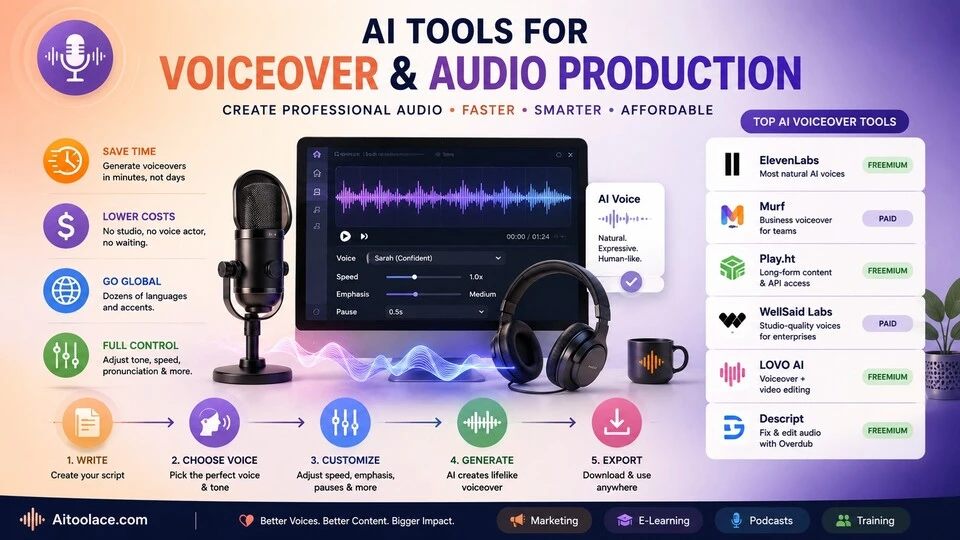
| Tool | Best For | Key Strength | Pricing |
|---|---|---|---|
| ElevenLabs | Most natural voices | Highest quality AI voice generation available | Freemium |
| Murf | Business voiceover | Professional platform with team collaboration | Paid |
| Play.ht | Long-form and API | High-quality voices with developer-friendly API | Freemium |
| WellSaid Labs | Enterprise narration | Studio-quality voices for corporate content | Paid |
| LOVO AI | Video voiceover | Voice generation with built-in video editing | Freemium |
| Descript | Voice correction | Overdub feature for fixing recorded narration | Freemium |
Best AI Tools for Voiceover & Audio Production
ElevenLabs — Best Voice Quality
ElevenLabs produces the most natural-sounding AI voices available. The voices convey emotion, handle pacing naturally, and maintain consistency across long passages. For content where voice quality directly affects the listener’s experience, ElevenLabs sets the standard that other tools are measured against.
What it does well:
- generates the most natural-sounding AI voices available — many listeners can’t distinguish them from human recordings
- supports voice cloning — upload a sample of any voice and generate new content in that voice
- handles emotional range well — the same voice can sound conversational, authoritative, excited, or empathetic based on context and settings
- supports 29+ languages with natural-sounding accent and pronunciation for each
- provides granular control over stability, clarity, and expressiveness for fine-tuning output
Where it falls short: The free tier is limited — meaningful production requires a paid plan. Voice cloning, while impressive, raises ethical questions about consent and misuse. The highest quality voices consume more processing credits, which affects cost at scale. Long-form content (audiobooks, full courses) can develop subtle repetitive patterns that become noticeable over extended listening. And while the voices sound natural, they lack the performance choices a skilled voice actor makes — emphasis, timing, and interpretation that elevate narration beyond reading words aloud.
Best for: content producers who need the highest quality AI voiceover — marketing videos, product demos, explainer content, and any project where voice quality directly affects audience perception.
Murf — Best for Business Voiceover
Murf is designed for business teams that produce voiceover content regularly. It provides a library of professional voices, a timeline editor for syncing voice with video, team collaboration features, and brand voice consistency tools — making it a production platform rather than just a voice generator.
What it does well:
- provides a large library of professional-quality voices organized by use case (corporate, e-learning, marketing, conversational)
- includes a timeline editor that syncs voiceover with video, images, and presentations
- supports team collaboration — multiple team members can work on projects with shared voice settings and brand guidelines
- allows fine-tuning of pitch, speed, emphasis, and pauses for precise control over the narration
- exports in multiple formats optimized for different platforms (video, podcast, presentation, phone system)
Where it falls short: Murf’s voice quality is professional but slightly below ElevenLabs for the most demanding applications. The platform is designed for regular production — occasional users may find it more complex than they need. The pricing targets business teams, which makes it expensive for individual creators. And the timeline editor, while useful, is basic compared to dedicated video editing tools — for complex audio-visual projects, you’ll still need a separate video editor.
For creating presentations with voiceover, see Best AI Tools for Presentations.
Best for: business teams that produce voiceover content regularly — training departments, marketing teams, and content producers who need consistent quality with team collaboration.
Play.ht — Best for Long-Form Content and API
Play.ht provides high-quality voice generation with a developer-friendly API that makes it practical to integrate AI voiceover into applications, websites, and automated content pipelines. For organizations that need programmatic voice generation at scale, Play.ht provides the infrastructure.
What it does well:
- provides a robust API for integrating voice generation into applications and automated workflows
- handles long-form content well — articles, courses, and documentation converted to audio without quality degradation
- supports voice cloning with a small number of audio samples
- offers a WordPress plugin that automatically generates audio versions of blog posts
- provides ultra-realistic voices across multiple languages
Where it falls short: Play.ht’s value is strongest when you use the API for automated or high-volume voice generation. If you just need occasional voiceover for individual projects, simpler tools (ElevenLabs, Murf) provide a better experience. The API requires technical knowledge to implement. The WordPress plugin is useful but adds page load time and hosting costs for the audio files. And voice quality, while high, varies by voice and language — some voices are significantly more natural than others.
For content that needs audio versions, see Best AI Tools for Content Creators.
Best for: developers and content platforms that need programmatic voice generation — automated article-to-audio, application voice features, and high-volume content production.
WellSaid Labs — Best for Enterprise Narration
WellSaid Labs focuses on studio-quality voice production for enterprise content — corporate training, e-learning modules, product documentation, and internal communications. The voices are specifically designed for professional narration rather than conversational use.
What it does well:
- produces studio-quality narration voices designed specifically for professional and corporate content
- provides pronunciation controls for industry-specific terminology, product names, and acronyms
- supports enterprise security and compliance requirements for organizations with strict data policies
- includes collaboration tools for review and approval workflows in corporate environments
- maintains consistent voice quality and character across long training modules and course content
Where it falls short: WellSaid Labs focuses on narration — the voices are designed to read content clearly and professionally, not to sound conversational or emotional. For marketing content that needs personality or engagement, ElevenLabs or Murf may produce better results. Enterprise pricing puts it out of reach for small businesses and individual creators. And the voice selection, while high-quality, is smaller than ElevenLabs’ library.
For corporate training content, see Best AI Tools for Learning New Skills.
Best for: enterprise organizations producing professional narration at scale — training departments, documentation teams, and corporate communications that need consistent, studio-quality voice.
LOVO AI — Best for Video Voiceover
LOVO AI combines voice generation with a built-in video editor, making it a single platform for creating videos with AI narration. Instead of generating voice in one tool and editing video in another, LOVO handles both — which simplifies the workflow for content that combines voice and visuals.
What it does well:
- combines AI voice generation with video editing in one platform — no switching between tools
- provides voice generation with lip-sync capabilities for avatar-based video content
- supports 100+ voices across multiple languages
- includes stock footage, images, and music alongside the voice and video tools
- templates for common video types (explainers, training, social media) speed up production
Where it falls short: LOVO tries to do both voice and video, which means neither function is as deep as dedicated tools. The video editing is basic compared to Descript or Premiere. The voice quality is good but below ElevenLabs. The combined approach works best for simple video content (explainers, presentations) but becomes limiting for complex video projects. And the pricing reflects the combined feature set — you’re paying for both voice and video capabilities even if you only need one.
For video editing specifically, see Best AI Tools for Video Editing.
Best for: content creators who produce simple videos with voiceover (explainers, product demos, social content) and want one platform for both voice and video.
Descript — Best for Voice Correction
Descript approaches voiceover differently from the other tools. Instead of generating voice from text, its Overdub feature lets you fix mistakes in recorded narration. Misspoke a word? Type the correction and Descript generates the corrected audio in your voice. This bridges the gap between human recording and AI voice generation.
What it does well:
- Overdub generates audio in your own voice to correct mistakes, insert new words, or extend existing recordings
- eliminates the need to re-record entire sections when you make a small mistake or need to update one line
- integrates correction into the broader editing workflow — text-based editing, filler word removal, and overdub in one tool
- maintains your actual voice rather than switching to a generic AI voice
- useful for updating existing content without re-recording everything
Where it falls short: Overdub requires training on your voice — you need to record a set of phrases for the AI to learn your voice characteristics. The generated audio, while impressive, doesn’t perfectly match natural speech for all words and contexts — careful listeners may notice overdubbed sections. Descript is primarily a podcast and video editing tool; if you only need voiceover generation without editing, dedicated tools (ElevenLabs, Murf) are more appropriate. And Overdub works for corrections and insertions, not for generating entire narrations from scratch in your voice.
For podcast editing workflows, see Best AI Tools for Podcast Production.
Best for: podcasters, YouTubers, and narrators who record their own voice and need to fix mistakes or update content without re-recording entire sessions.
The Real Risks of AI Voiceover
1. Voice Cloning Without Consent
AI voice cloning can replicate anyone’s voice from a short audio sample. Using someone’s voice without their explicit consent — even for internal content — raises serious ethical and potentially legal issues. Always obtain clear permission before cloning anyone’s voice, and never use voice cloning for deceptive purposes.
2. Uncanny Valley for Demanding Content
AI voices have improved dramatically, but they still lack the subtle performance qualities that skilled voice actors bring — the micro-pauses, the emphasis choices, the emotional authenticity that makes narration compelling rather than just clear. For content where voice performance significantly impacts the audience experience (brand commercials, audiobooks, emotional narratives), human voice actors still deliver superior results.
3. Over-Reliance Reducing Audio Quality Standards
Because AI voiceover is fast and cheap, there’s a temptation to skip the quality review that professional audio production requires. Background noise in the recording environment isn’t a concern with AI, but other quality issues emerge — unnatural pacing, mispronounced words, inappropriate tone for the content. Review AI voiceover with the same critical ear you’d apply to human recordings.
4. Legal and Rights Considerations
The legal landscape around AI-generated voice is evolving. Some jurisdictions are developing laws about synthetic voice content. Voice actors’ unions are negotiating protections. Using AI voices for commercial content may have legal implications that haven’t been fully resolved. Stay informed about the regulations in your market.
Which AI Tool Should You Choose?
- Highest quality voices → ElevenLabs (most natural AI voices available)
- Business team production → Murf (professional platform with collaboration)
- API and long-form → Play.ht (developer-friendly with automated workflows)
- Enterprise narration → WellSaid Labs (studio-quality corporate voice)
- Voice + video combined → LOVO AI (single platform for video with narration)
- Fix recorded narration → Descript (overdub corrections in your own voice)
Best starting approach: Start with ElevenLabs’ free tier to test AI voiceover quality for your use case. If the quality meets your needs, evaluate whether you need a production platform (Murf), API access (Play.ht), or enterprise features (WellSaid Labs). For podcasters and video creators who record their own voice, Descript’s Overdub is the most practical addition.
Frequently Asked Questions
What is the best AI voiceover tool?
ElevenLabs produces the highest quality voices. Murf is best for business teams. Play.ht is best for API integration and automation. The right choice depends on whether you prioritize voice quality, team workflow, or technical integration.
Can AI voiceover replace human voice actors?
For most business content (training, explainers, product demos, documentation), AI voices are good enough and significantly cheaper and faster. For premium content where voice performance defines the experience (commercials, audiobooks, brand content), human voice actors still deliver superior results. The line is moving — AI quality improves every year.
Is AI voice cloning legal?
Cloning your own voice or a voice you have explicit permission to clone is generally legal. Cloning someone’s voice without consent is ethically problematic and may violate laws in some jurisdictions. The legal framework is evolving — check the regulations in your market and always obtain explicit consent before cloning anyone’s voice.
How natural do AI voices sound?
The best AI voices (ElevenLabs, WellSaid Labs) are indistinguishable from human voices for most listeners in most contexts. Quality varies by voice, language, and content type. Short segments sound more natural than very long narrations. Conversational content sounds more natural than highly technical or emotional content.
Can I use AI voiceover for commercial content?
Yes, the tools in this guide are licensed for commercial use. Check the specific terms of each tool regarding usage rights, attribution requirements, and any restrictions on certain use cases (political content, impersonation, etc.).
How much does AI voiceover cost compared to human voice actors?
AI voiceover typically costs a fraction of human voice talent. Human voice actors charge anywhere from $100 to $1,000+ per finished minute depending on experience and usage rights. AI voiceover tools range from free tiers to $20-50/month for substantial production volume. The cost savings are most significant for high-volume, regularly updated content.
Related AI Tools Guides
- Best AI Tools for Podcast Production
- Best AI Tools for Video Editing
- Best AI Tools for Content Creators
- Best AI Tools for Musicians
- Best AI Tools for Learning New Skills
Explore all AI tools → Browse by profession and use case
Last updated: June 2026